Firefly III: The Self-Hosted Household Ledger
Firefly III 6.7 with Postgres 18 behind Traefik: three keys, a cron container with a catch – and why registration closes itself after the first account.
Table of contents
Your bank statements are in good hands at your bank, your analysis of them not necessarily. Firefly III is a household ledger with double-entry bookkeeping that runs entirely on your own server and sends not a single line to anyone else.
What are we building?
We run Firefly III 6.7.9 with PostgreSQL 18.7 behind Traefik, plus a small cron container for recurring transactions. At the end you create accounts, record expenses with a category, and see on the start page where the money goes.
Not included: Firefly III does not fetch bank transactions by itself. That is what the separate Data Importer is for, which reads your bank’s CSV exports. It is a service of its own with its own configuration. This tutorial builds the foundation it sits on; part 2 on the data importer sets the importer up.
Double-entry bookkeeping, whether you want it or not
Requirements
- A reverse proxy with Traefik and a subdomain pointing at the server
- A working Restic backup, because this is your financial data and not some test material
- About 45 minutes
VPS 1000 G12.5
4 vCores · 8 GB RAM · 128 GB SSD
from €14.50/month
Measured in operation: Firefly III around 120 MB, PostgreSQL around 45 MB, cron under 1 MB. That runs on the small VPS next to other services.
💶 1 month free:
Single use, valid for VPS 1000 G12.5. Redeem in the cart →
💶 €5.95 voucher for new netcup customers: always valid · not for domains or VPS Lite
Step by step
Step 1: Three values that have to be fixed before the first start
Firefly III needs two strings of exactly 32 characters and a database password:
mkdir -p /opt/firefly && cd /opt/firefly
openssl rand -base64 24 | tr -d '\n' | head -c 32; echo   # APP_KEY
openssl rand -hex 16                                      # STATIC_CRON_TOKEN
openssl rand -hex 16                                      # database password
APP_KEY encrypts content in the database. The 32 characters are mandatory; the official example
file even spells it out in the placeholder with APP_KEY=SomeRandomStringOf32CharsExactly. Change
the key later and encrypted fields are unreadable.
STATIC_CRON_TOKEN is also 32 characters long and protects the endpoint that triggers the nightly
job. openssl rand -hex 16 produces exactly that length.
Step 2: The configuration
# /opt/firefly/.env
APP_ENV=production
APP_DEBUG=false
APP_KEY=YOUR_32_CHARACTER_KEY
APP_URL=https://money.YOUR_DOMAIN
SITE_OWNER=you@YOUR_DOMAIN
TZ=Europe/Berlin
DEFAULT_LANGUAGE=en_US
TRUSTED_PROXIES=172.18.0.0/16

DB_CONNECTION=pgsql
DB_HOST=db
DB_PORT=5432
DB_DATABASE=firefly
DB_USERNAME=firefly
DB_PASSWORD=YOUR_DB_PASSWORD
POSTGRES_PASSWORD=YOUR_DB_PASSWORD

STATIC_CRON_TOKEN=YOUR_32_CHARACTER_TOKEN
MAIL_MAILER=log
TRUSTED_PROXIES is the Docker network Traefik comes from. Without it Firefly considers the
connection unencrypted and builds links with http://. Which network that is, docker network inspect proxy --format '{{ range .IPAM.Config }}{{ .Subnet }} {{ end }}' tells you.
DEFAULT_LANGUAGE sets the interface language, including the sign-in page. MAIL_MAILER=log only
writes mail to the log. For a household ledger without password resets by mail that is enough; you
add real mail sending later.
chmod 600 /opt/firefly/.envStep 3: The stack
# /opt/firefly/compose.yaml
services:
  db:
    image: postgres:18.7-alpine
    container_name: firefly-db
    restart: unless-stopped
    environment:
      POSTGRES_USER: firefly
      POSTGRES_PASSWORD: ${POSTGRES_PASSWORD}
      POSTGRES_DB: firefly
    volumes:
      - pgdata:/var/lib/postgresql
    networks: [firefly-intern]
    healthcheck:
      test: ["CMD-SHELL", "pg_isready -U firefly"]
      interval: 10s
      timeout: 5s
      retries: 6

  app:
    image: fireflyiii/core:version-6.7.9
    container_name: firefly
    restart: unless-stopped
    depends_on:
      db:
        condition: service_healthy
    env_file: .env
    volumes:
      - upload:/var/www/html/storage/upload
    networks: [firefly-intern, proxy]
    labels:
      - traefik.enable=true
      - traefik.docker.network=proxy
      - traefik.http.routers.firefly.rule=Host(`money.YOUR_DOMAIN`)
      - traefik.http.routers.firefly.entrypoints=websecure
      - traefik.http.routers.firefly.tls.certresolver=le
      - traefik.http.routers.firefly.middlewares=firefly-only-me
      - traefik.http.middlewares.firefly-only-me.ipallowlist.sourcerange=YOUR_IPV4/32,YOUR_IPV6_PREFIX::/64
      - traefik.http.services.firefly.loadbalancer.server.port=8080

  cron:
    image: alpine:3.24
    container_name: firefly-cron
    restart: unless-stopped
    env_file: .env
    networks: [firefly-intern]
    command: >
      sh -c "echo \"0 3 * * * wget -qO- http://app:8080/api/v1/cron/$$STATIC_CRON_TOKEN\" | crontab - &&
      crond -f -L /dev/stdout"

volumes:
  pgdata:
  upload:

networks:
  firefly-intern:
    internal: true
  proxy:
    external: true
The database sits in a network with internal: true and is therefore unreachable both from outside
and from the proxy network. The mount is on /var/lib/postgresql and not on
/var/lib/postgresql/data: from PostgreSQL 18 onwards the container refuses to start with the old
path.
firefly-only-me lets only your own address through until the setup is finished; everyone else
gets 403 Forbidden. As long as no admin account exists, the instance otherwise belongs to whoever
opens the page first, and scanners sometimes find new hostnames via the public certificate logs
within seconds of the start. Look up your addresses on your own computer, not on the server:
curl -4 -s https://ifconfig.me for the IPv4, curl -6 -s https://ifconfig.me for the IPv6 (take
the first four blocks). If you have no IPv6, drop the second entry including the comma. But only
then: browsers prefer IPv6, and an IPv4-only list locks you out yourself. More on this in
Hardening Traefik.
The cron container has no internet
The official template has the cron container run apk add tzdata at startup. On the internal
network that fails with ERROR: unable to select packages: tzdata (no such package) and the
container restarts in a loop, because it cannot reach Alpine’s package sources.
That is why there is no apk add in the command above. The price: the cron schedule runs in
UTC, so the nightly job starts at 3 a.m. UTC instead of 3 a.m. local time. For a job that
creates recurring transactions that makes no difference.
Step 4: Start and check
cd /opt/firefly
docker compose up -d
docker compose ps --format '{{ .Name }}\t{{ .Status }}'firefly Up 15 seconds (healthy)
firefly-cron Up 25 seconds
firefly-db Up 26 seconds (healthy)On the first start Firefly creates the schema; the healthy state only comes after that. Then check
that the cron entry is really in place:
docker compose exec cron crontab -l0 3 * * * wget -qO- http://app:8080/api/v1/cron/YOUR_32_CHARACTER_TOKENAnd trigger the job once by hand instead of waiting until 3 a.m.:
docker compose exec cron sh -c 'wget -qO- http://app:8080/api/v1/cron/$STATIC_CRON_TOKEN'{"recurring_transactions":[],"auto_budgets":[],"exchange_rates":[],"bill_notifications":[],"webhooks":[]}The empty lists are correct: Firefly runs every job per user, and there is no user yet. Once you have
created your account in step 5, four of the five lists hold an entry with "job_fired":true and
"job_succeeded":true. exchange_rates stays empty because exchange rates are switched off out of
the box. Call the endpoint a second time on the same day and it reports "job_fired":false with
It will not fire now: every job runs at most once a day, so this is not a fault. If an HTML page
comes back instead, the token is wrong.
Step 5: The first user is the boss
Open https://money.YOUR_DOMAIN/. Because nobody exists yet, you land directly on the registration
page:
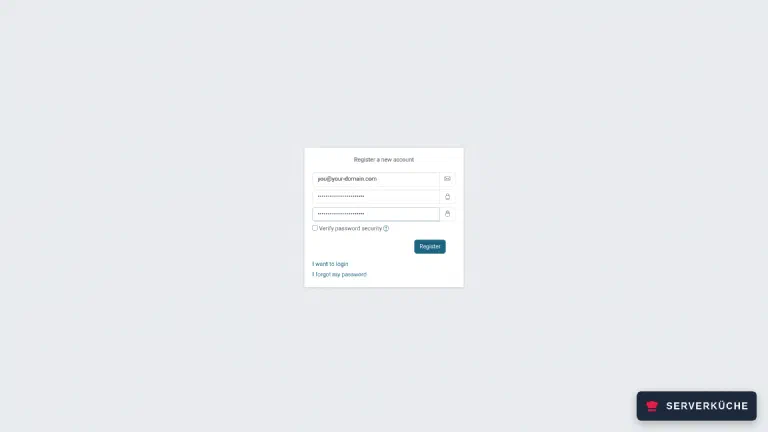
The first account automatically becomes the administrator. And it is at the same time the last one
that can be created without help: Firefly III runs in single user mode out of the box. Anyone
calling /register afterwards lands on an error page headed “Whoops! An error occurred.” with the
sentence “Unfortunately, this error was not recoverable :(. Firefly III broke. The error is:”.
Below it is the actual reason:
Registration is currently not available. If you are the administrator,
you can enable this in the administration.
The page sounds more dramatic than it is. Nothing is broken, registration is merely closed, and that is a remarkably sensible default. With many other applications you have to remember to close it yourself. You can look at it and change it from the user menu at the top right (the person icon) under System settings → Firefly III configuration:
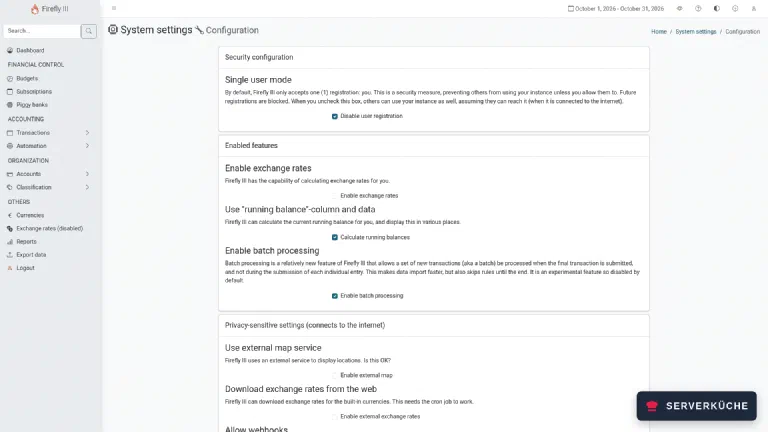
If you want to give someone access, you briefly enable registration here and switch it off again afterwards.
Until your account exists, however, registration is open, and scanners often come knocking within minutes of the certificate being issued. The lock from step 3 closes that window.
Once your account exists, remove the lock again: delete the two lines containing firefly-only-me
from the compose.yaml and apply the change:
docker compose up -dFirefly restarts in the process. Until the container counts as healthy again, Traefik does not
include it in its routes and answers with 404 for a few seconds.
Step 6: Create accounts
After registering, a short setup asks for the name of your bank, the balance, your
savings and the language. The name becomes your main account; next to it Firefly creates a savings
account (Checking account savings account if you enter “Checking account”) and a cash wallet. All
of it can be changed and extended later.
What matters is the difference between account types:
asset account      your real money: current account, savings, wallet
expense account    where money flows to: supermarket, utilities, landlord
revenue account    where money comes from: employer, refunds
You do not have to create expense and revenue accounts in advance: type a name that does not exist yet while booking, and Firefly creates it.
Step 7: The first transaction
Through Transactions → Expenses → Create a new transaction you reach the form:
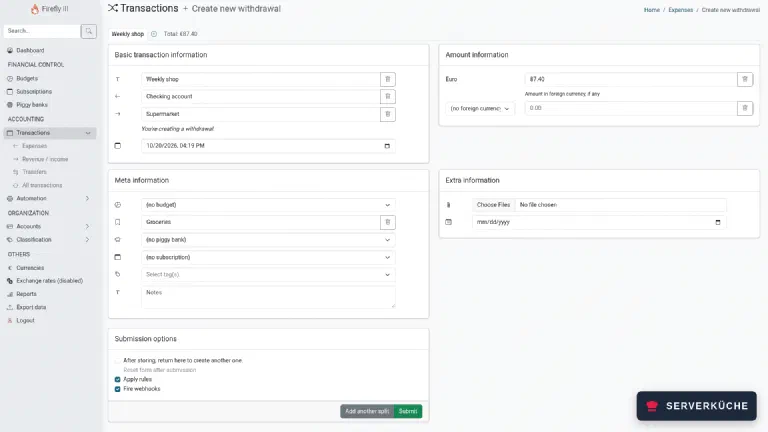
For the source account it is best to pick from the suggestion list. Typed text only works if it matches the name of an asset account exactly, down to upper and lower case (see “When it doesn’t work”). The destination account, on the other hand, may be entered freely. The category is optional, but it is the reason the reports are worth anything later. Get into the habit of filling it in right away.
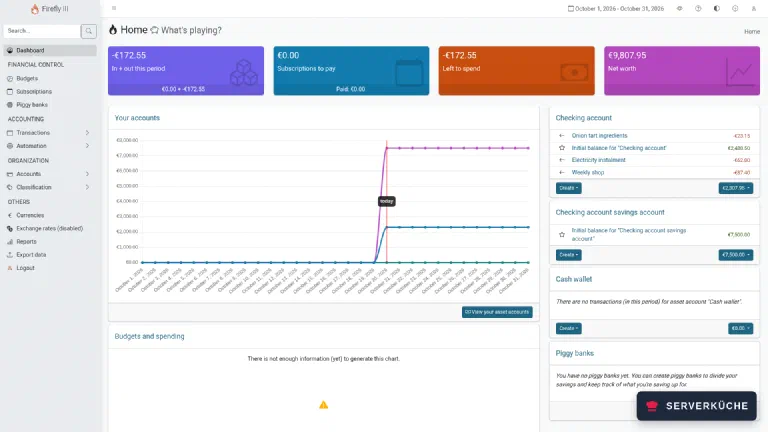
After a few transactions the overview becomes useful:
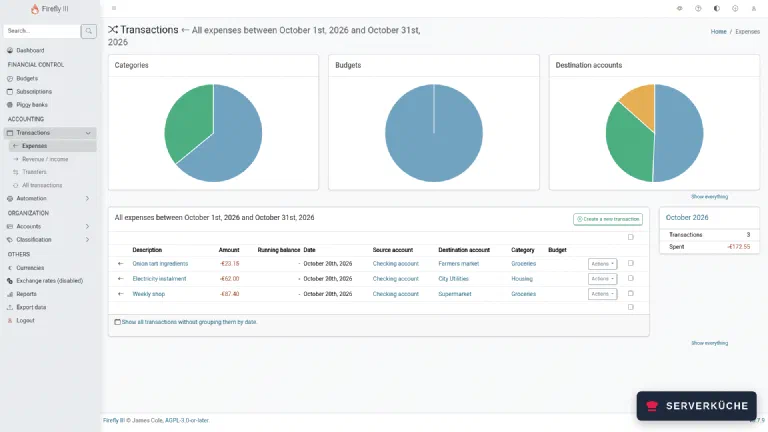
And the expense list shows where the money went:
When it doesn’t work
The page responds with 403 Forbidden. The lock from step 3 doesn’t let your address through. Usually the IPv6 is missing or has changed. Look up both addresses again (see there), correct sourcerange and restart with docker compose up -d.
The cron container restarts over and over and reports ERROR: unable to select packages: tzdata (no such package). It sits on the internal network and cannot reach Alpine’s package sources. The official template installs tzdata there, which does not work without internet. Take the apk add out of the command; the container does not need it, it only has to reach app:8080. The cron schedule then runs in UTC.
Saving a transaction returns There was something wrong with your submission … The selected transactions.0.type is invalid. Firefly found no asset account matching the text in the source account field. That happens when you only type the beginning (“Check”), make a typo or the spelling differs (“checking account”). Type the beginning, wait for the suggestion list and click the entry. Careful with the arrow key: the first suggestion is already highlighted, and one press down selects the next one, so for “Check” that is the savings account. The destination account behaves differently: a new name is allowed there, and Firefly creates it as an expense account.
/register shows “Whoops! An error occurred.” and “Firefly III broke.” Below that it says Registration is currently not available. Behind it is single user mode, which is active out of the box. From the user menu at the top right, under System settings → Firefly III configuration, you can switch it off temporarily, have the second account created and switch it back on. Anyone leaving the mode off permanently has an open registration sitting on the internet.
The container reports NGINX + PHP-FPM is running correctly and the site still throws errors. Then look at the beginning of the log: docker compose logs app | head -60. The most common cause is an APP_KEY that is not exactly 32 characters. The startup scripts run through and report the web server as ready, while the application itself aborts during boot with a stack trace. That is what makes the fault so unpleasant: the container looks healthy.
Links in the interface point to http:// instead of https://. Firefly only knows the real address from APP_URL and the forwarding headers. Check whether APP_URL contains the full https:// address and whether TRUSTED_PROXIES names the Docker network Traefik comes from. Both have to be right: one sets the base address, the other allows Firefly to believe the proxy in the first place.
Your problem is not listed? Search all error messages →
Maintenance & backups
Updates go through the image tag; Firefly handles the database migrations itself at start:
cd /opt/firefly
docker compose exec -T db pg_dump -U firefly firefly > before-update-$(date +%F).sql
sed -i 's/core:version-6.7.9/core:version-NEW_VERSION/' compose.yaml
docker compose pull && docker compose up -d
docker compose logs app --tail 20
Pin the tag to the exact version and do not use latest: Firefly III publishes daily develop
builds alongside the stable versions, and accidentally jumping onto one of those is not a good idea
on a household ledger. You find the current stable state at the
releases on GitHub.
Three things have to go into the backup, and the first one is the decisive one:
/opt/firefly/.env            # APP_KEY – without it the database is useless
pg_dump output               # accounts, transactions, categories, rules
volume firefly_upload        # attached receipts
The APP_KEY encrypts fields in the database. A dump without the matching key is worthless. Both
belong together in your Restic backup, encrypted, because this is
your complete financial situation.
Firefly III additionally ships its own export (Export data) that writes everything out as CSV. That does not replace a backup, but it is the insurance against being stuck in one format some day. Run it once a year and put it away.
Resource use is small and stays that way. After a few page views:
firefly         120 MB
firefly-db       43 MB
firefly-cron    0.4 MB
Right after a restart Firefly sits at around 25 MB and grows to this value with the first requests. The database was at 12 MB after setup. It grows with the number of transactions, and even with daily use that is a few thousand a year; space is never the problem here.
Realistic effort: an update every few weeks with a dump beforehand, ten minutes. The real work is the bookkeeping itself, and no tool takes that off you. Plan ten minutes a week for it rather than a big catch-up every quarter. Firefly III is mercilessly honest about how patchy the reports get when transactions are missing.
Send feedback: feedback@serverkueche.de
What's next?

You might also like