FreshRSS: Your Own RSS Reader
All your news sources in one place, no algorithm and no tracking: FreshRSS as a self-hosted RSS reader behind Traefik – with mobile app sync and backup.
Table of contents
RSS is the best news format most people have forgotten: you subscribe to sources directly, with no algorithm, no ads and no one watching what you read. FreshRSS gathers all your sources in one self-hosted place – and even syncs with the RSS apps on your phone.
What are we building?
Your own RSS reader with FreshRSS (v1.30.4) behind Traefik, collecting your news sources and keeping them fresh via cron in the background. By the end you read news sites, blogs and podcast feeds in one place, grouped into categories – and can connect mobile apps like Reeder or FeedMe via the built-in Google Reader API. FreshRSS is refreshingly lightweight: SQLite is enough, no separate database needed.
Prerequisites
- A server with Traefik running and Docker Compose
- A subdomain pointing at the server –
YOUR_DOMAINbelow (e.g.rss.YOUR_DOMAIN)
VPS 1000 G12.5
4 vCores · 8 GB RAM · 128 GB SSD
from €14.50/month
FreshRSS is frugal – the smallest VPS handles many feeds.
💶 1 month free:
Single use, valid for VPS 1000 G12.5. Redeem in the cart →
💶 €5.95 voucher for new netcup customers: always valid · not for domains or VPS Lite
Step by step
Step 1: Create the Compose file
FreshRSS keeps everything in a data directory (SQLite database, config, cache). Create the project:
mkdir -p /opt/freshrss && cd /opt/freshrssThe compose.yaml – replace YOUR_DOMAIN:
services:
  freshrss:
    image: freshrss/freshrss:1.30.4
    restart: unless-stopped
    volumes:
      - ./data:/var/www/FreshRSS/data
      - ./extensions:/var/www/FreshRSS/extensions
    environment:
      TZ: Europe/Berlin
      CRON_MIN: '13,43'
    networks: [proxy]
    labels:
      - "traefik.enable=true"
      - "traefik.http.routers.freshrss.rule=Host(`YOUR_DOMAIN`)"
      - "traefik.http.routers.freshrss.entrypoints=websecure"
      - "traefik.http.routers.freshrss.tls.certresolver=le"
      - "traefik.http.routers.freshrss.middlewares=freshrss-only-me"
      - "traefik.http.middlewares.freshrss-only-me.ipallowlist.sourcerange=YOUR_IPV4/32,YOUR_IPV6_PREFIX::/64"
      - "traefik.http.services.freshrss.loadbalancer.server.port=80"

networks:
  proxy:
    external: true
CRON_MIN is a nice touch of the official image: the startup code turns it into a cron entry inside the container that refreshes the feeds at the given minutes (here 13 and 43 of every hour) – you need no external timer.
Do not create the data and extensions directories yourself: the container creates them on first start and sets the permissions itself (root:www-data, group writable – see Users & permissions for what that means). That holds on hardened servers with UMASK 027 as well.
freshrss-only-me lets only your own address through until the setup is finished; everyone else gets 403 Forbidden. As long as no admin account exists, the instance otherwise belongs to whoever opens the page first – and scanners sometimes find new hostnames via the public certificate logs within seconds of the start. Look up your addresses on your own computer, not on the server: curl -4 -s https://ifconfig.me for the IPv4, curl -6 -s https://ifconfig.me for the IPv6 (take the first four blocks). If you have no IPv6, drop the second entry including the comma – but only then: browsers prefer IPv6, and an IPv4-only list locks you out yourself. More on this in Hardening Traefik.
Step 2: Start
docker compose up -dA quick look at the container status – Up, and port 80 stays inside the container because everything from outside goes through Traefik:
docker compose psNAME IMAGE COMMAND SERVICE CREATED STATUS PORTS
freshrss-freshrss-1 freshrss/freshrss:1.30.4 "./Docker/entrypoint…" freshrss 11 seconds ago Up 10 seconds 80/tcpFrom your own computer, check that FreshRSS responds with valid HTTPS (the 302 is the redirect to the install wizard; from the server, freshrss-only-me only returns 403):
curl -sI https://YOUR_DOMAIN/ | head -1HTTP/2 302If you get a certificate error instead of the 302, Traefik hasn’t issued the certificate yet – that takes a few seconds after the first start.
Step 3: The install wizard
Open https://YOUR_DOMAIN/ in the browser. The wizard walks you through setup in five steps – language, checks, database, general configuration, done:
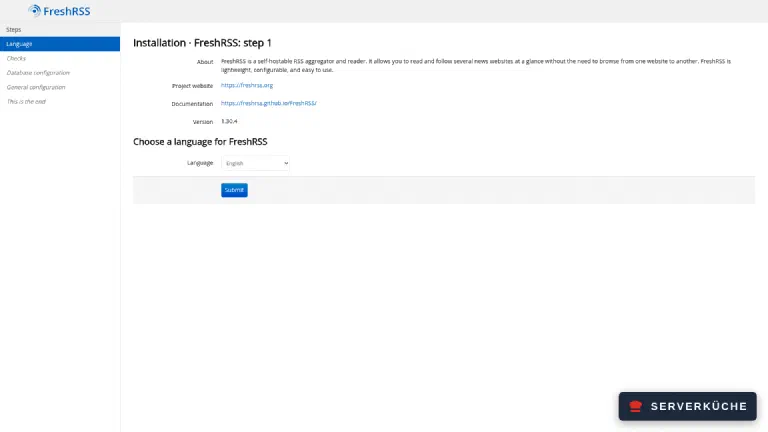
Step 2 lists the PHP and file permission checks; with the official image you only get green “OK!” lines there, including the one for the data directory. Choose SQLite as the database type (no further details needed), Web form authentication and create your administrator account with a strong password. The last step confirms “Congratulations! The installation process was successful.” – only the click on Complete installation finishes setup and takes you to the login.
Alternative: setup from the command line
docker compose exec -u www-data freshrss ./cli/do-install.php --default-user admin --auth-type form --db-type sqlite --language en --base-url https://YOUR_DOMAIN, then ./cli/create-user.php --user admin --password 'YOUR_PASSWORD'. The --base-url matters: the graphical wizard fills it in by itself, the CLI path does not – and without it the status page at /api/ later advertises a wrong API address.Once the installation is complete, remove the lock again: delete the two lines containing freshrss-only-me from the compose.yaml and apply the change:
docker compose up -dStep 4: Subscribe to your first feeds
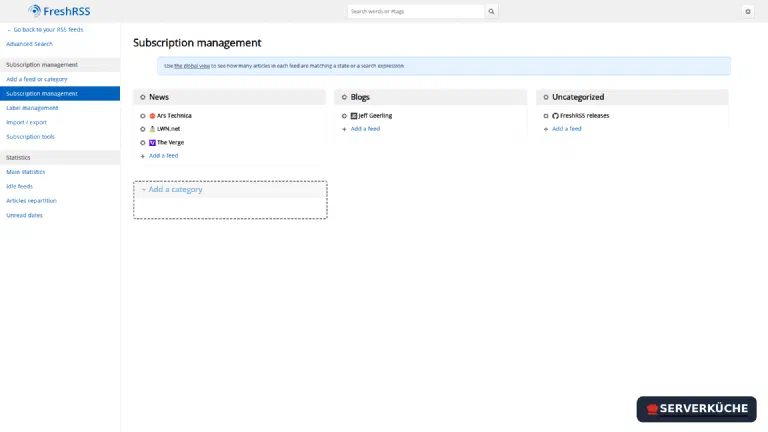
Click Subscription management → Add a feed or category at the top left. Enter a source’s feed URL (e.g. https://feeds.arstechnica.com/arstechnica/index) and assign it to a category. FreshRSS detects the feed format automatically. After adding several sources the management view looks like this:
Bring existing feeds via OPML
Step 5: Reading
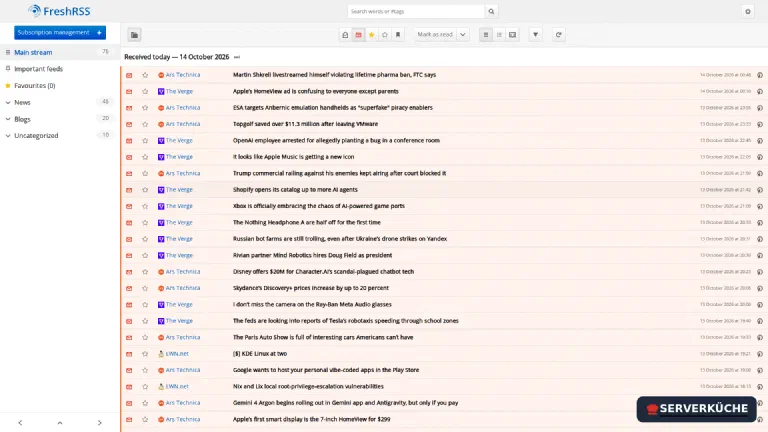
Back in the reading view, FreshRSS collects articles from all sources chronologically, grouped by category. Unread counters per feed, stars for favorites, full-text search – it’s all there:
Step 6: Connect mobile apps (optional)
FreshRSS speaks the Google Reader API, so many mobile apps can use it as a sync backend. That takes two switches, not one – and the first app login usually fails on exactly that.
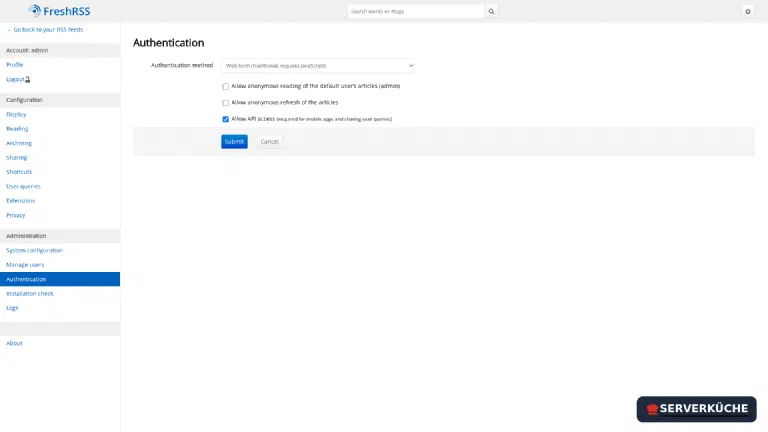
First the server-wide switch: Settings → Administration → Authentication → Allow API access, then submit. FreshRSS asks for your password again before the administration pages; that reauthentication is then valid for 20 minutes.
Then the personal password: Settings → Profile → External access via API, where you set a separate API password – not your login password, because it travels in clear text and can show up in server logs. The same page links the status page https://YOUR_DOMAIN/api/, which tells you the correct API address and tests the configuration itself.
In the app (e.g. Reeder, FeedMe, NetNewsWire) choose “FreshRSS” or “Google Reader API”, enter https://YOUR_DOMAIN/api/greader.php, your username and the API password – and keep reading in sync on the go.
Feeds from your own network since 1.30
127.0.0.1 or on a neighbouring container is rejected with URL is not allowed to be resolved. If you need such a source (an RSS bridge in the same Compose network, say), allow it explicitly: INTERNAL_HOST_ALLOWLIST: rss-bridge:80 as an environment variable in the Compose file – one entry per host, host:port or CIDR. A * allows everything and defeats the protection.When things go wrong
The page responds with 403 Forbidden. The lock from step 1 doesn’t let your address through. Usually the IPv6 is missing or has changed – look up both addresses again (see there), correct sourcerange and restart with docker compose up -d.
After setup you end up back at step 1 of the wizard. The installation only counts as finished once you click “Complete installation” in the last step – close the browser window before that and the next visit drops you back into the wizard. Just walk through it again and click all the way to the end this time. You don’t have to worry about file permissions along the way: the official image fixes group and mode of the data directory on every start – including a folder restored from a backup.
Feeds don’t refresh automatically. First check whether the cron entry inside the container exists at all: docker compose exec freshrss crontab -l must print a line starting with your CRON_MIN minutes (13,43 * * * * …). If it’s missing, CRON_MIN wasn’t set at start – add the variable and run docker compose up -d. What the last run did is logged inside the container at /tmp/FreshRSS.log (docker compose exec freshrss tail /tmp/FreshRSS.log). You can trigger a refresh anytime with docker compose exec -u www-data freshrss ./cli/actualize-user.php --user admin.
The mobile app won’t connect and reports a server error. If https://YOUR_DOMAIN/api/greader.php answers 503 Service Unavailable!, the server-wide switch from step 6 is missing: without the “Allow API access” box under Administration → Authentication, even a configured API password gets you nowhere. With both in place the API answers a login with 200 and returns an Auth token.
A feed from your own network stays empty. Since 1.30 FreshRSS blocks local targets; the log says URL is not allowed to be resolved or Fetching this URL is not allowed, because the host’s IP is not in the allowlist. The fix is the INTERNAL_HOST_ALLOWLIST environment variable (see the box above) – or the same list under Administration → System configuration. If a feed from the public internet stays empty, the URL is usually an HTML page instead of the feed; search the page source for application/rss+xml.
Older articles disappear after a while. That’s archiving, and its defaults are deliberately strict: FreshRSS keeps articles for three months and at most 200 per feed, but never fewer than 50 – favourites and labelled articles are left alone. If you want to scroll back further, raise the values under Settings → Archiving or per feed in its settings; the database grows accordingly.
Your problem is not listed? Search all error messages →
Maintenance & backups
- Updates. Set the image tag (
freshrss/freshrss:1.30.4) to the new version, thendocker compose pull && docker compose up -d; FreshRSS migrates its database automatically at start. The project announces larger jumps in the release notes – 1.30, for instance, was a security release with one deliberate tightening (see the box about local feeds). Your normal update process handles the rest. - Backup. The entire state lives in the
datafolder (SQLite database + config). Add it to your Restic backup – then subscriptions, categories and read markers are safe. Copying a live SQLite file mid-write is a bad idea, though:docker compose exec -u www-data freshrss ./cli/db-backup.phpwrites a consistent copy todata/users/<user>/backup.sqlitefirst, which your backup then picks up. Additionally a regular OPML export of your feed list makes a human-readable, reader-independent backup. - Low effort. FreshRSS is a “set it up once, then it just runs” service. The only recurring task is curating your feed list – under Statistics → Idle feeds you see at a glance which sources haven’t delivered anything for months, and can prune them.
Last updated: Oct 31, 2026
Send feedback: feedback@serverkueche.de
You might also like