Host Your Own Website with Hugo – Like Serverküche Itself
Build a static website with Hugo and serve it from a Docker container behind Traefik – fast, secure, no database. Exactly the setup this site runs on.
Table of contents
The page you’re reading right now runs on exactly the setup from this tutorial: Hugo builds static HTML from Markdown files, and a tiny nginx container serves it behind Traefik. No WordPress, no database, no PHP security updates – and still a fully-featured website. This is maximum dogfooding: you’re reading a recipe on its own result.
What are we building?
Your own website with the static site generator Hugo (v0.165.0), built in a multi-stage Docker image and served by nginx 1.31 behind Traefik with automatic HTTPS. By the end you’ll have a blog-capable site under your domain, generated from simple Markdown files – and you’ll know how to publish new posts with a single rebuild. For design we use the popular PaperMod theme; the principle applies to any Hugo theme.
The big advantage over a classic CMS like WordPress: there’s no attack surface at runtime. What’s served is plain HTML, and the container contains no interpreter and no database that could be compromised.
Prerequisites
- A server with Traefik running as a reverse proxy (provides the HTTPS certificate)
- Docker & Docker Compose installed
- A domain pointing at the server – replace
YOUR_DOMAINbelow giton the server (apt install git) to fetch the theme
VPS 1000 G12.5
4 vCores · 8 GB RAM · 128 GB SSD
from €14.50/month
A static site is frugal – the smallest VPS is plenty.
💶 1 month free:
Single use, valid for VPS 1000 G12.5. Redeem it in an empty cart – the code adds the server itself. Redeem in the cart →
💶 €5 voucher for new netcup customers: always valid · not for domains or VPS Lite
Step by step
Step 1: Create the Hugo project
Create the project folder. Everything that makes up the site lives in this directory – including the Docker files:
mkdir -p /opt/hugo-demo/content/posts && cd /opt/hugo-demoGet the PaperMod theme. We clone it as a regular folder (not a Git submodule) so it’s guaranteed to be in the Docker build context:
git clone --depth=1 https://github.com/adityatelange/hugo-PaperMod.git themes/PaperMod
rm -rf themes/PaperMod/.git
--depth=1 fetches only the current state (no history), and deleting .git afterwards makes the theme a fixed part of your project.
Step 2: Configure Hugo
The central config is hugo.toml. Replace YOUR_DOMAIN with your real domain – Hugo builds absolute links on top of it:
baseURL = "https://YOUR_DOMAIN/"
languageCode = "en-us"
title = "My Serverküche Site"
theme = "PaperMod"

[params]
  description = "A test blog, hosted with Hugo and Docker."

[[menu.main]]
  name = "Posts"
  url = "/posts/"
  weight = 1
baseURL is crucial: if it holds the wrong domain, all internal links and assets point nowhere. The menu links to the post overview that Hugo generates automatically from the content/posts/ folder.
Step 3: Write content as Markdown
Every page is a Markdown file with a small header (front matter). The homepage:
cat > content/_index.md <<'EOF'
---
title: "Welcome"
---
This site is generated by **Hugo** and served as static HTML by nginx –
just like Serverküche itself.
EOF
And a first blog post under content/posts/:
cat > content/posts/first-post.md <<'EOF'
---
title: "My First Post"
date: 2026-07-20
tags: ["hugo", "docker"]
---
Hello world! This site runs in a Docker container behind Traefik with
automatic HTTPS.
EOFFuture-dated posts aren't built
date in the future. If you accidentally set a later date, the post can’t be found online (404) even though the file exists. For scheduled publishing you build deliberately with hugo --buildFuture – otherwise: no future dates.Step 4: The multi-stage Dockerfile
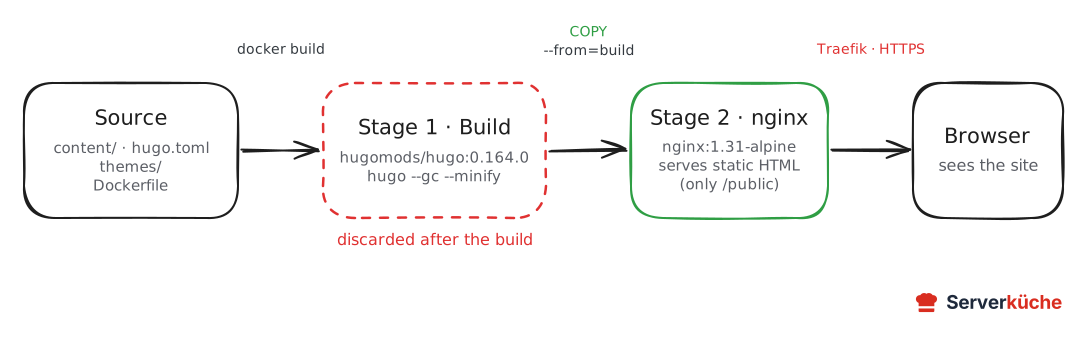
Now the core. A multi-stage build separates building from serving: the first stage contains Hugo and Node, builds the site and is then thrown away. The second stage is a tiny nginx image that contains only the finished HTML – no Hugo, no source code.
# Stage 1: build the site with Hugo
FROM hugomods/hugo:0.165.0 AS build
WORKDIR /src
COPY . .
RUN hugo --gc --minify

# Stage 2: serve statically with nginx
FROM nginx:1.31-alpine
COPY nginx.conf /etc/nginx/conf.d/default.conf
COPY --from=build /src/public /usr/share/nginx/html
EXPOSE 80
HEALTHCHECK --start-period=10s --start-interval=2s --interval=30s --timeout=3s --retries=3 \
  CMD wget -q --spider http://127.0.0.1/ || exit 1
hugo --gc --minify cleans up during the build (--gc) and compresses HTML/CSS/JS (--minify). The COPY --from=build pulls only the /src/public folder (the finished result) into the second stage. The HEALTHCHECK ensures Traefik only routes to the container once nginx actually responds.
Health check against 127.0.0.1, not localhost
localhost resolves to the IPv6 address ::1 first. If your nginx config only listens on IPv4 (listen 80;), a health check against http://localhost/ fails with “Connection refused” – the container stays unhealthy and Traefik never routes to it. So use http://127.0.0.1/. (This exact bug hit me while testing this tutorial.)Step 5: Configure nginx properly
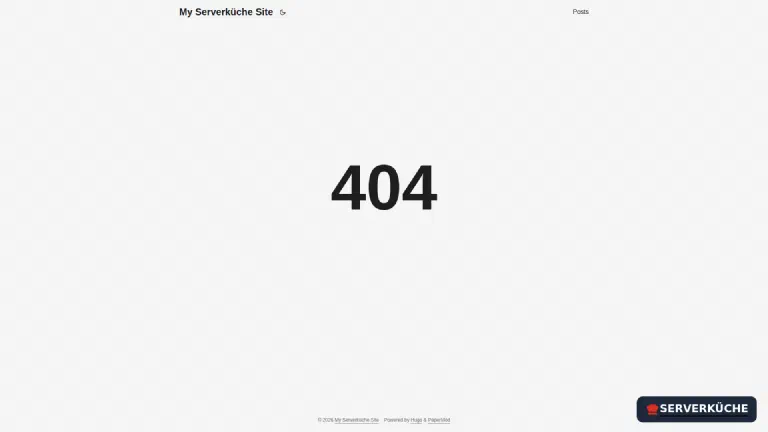
Without its own config, nginx serves its bare default 404 page on typos in the URL. Hugo ships its own, design-matching 404.html – nginx should use it:
server {
    listen 80;
    server_name _;
    root /usr/share/nginx/html;
    index index.html;

    location / {
        try_files $uri $uri/ =404;
    }

    # Serve Hugo's own 404 page instead of the nginx default
    error_page 404 /404.html;

    # Cache static assets for a long time (Hugo appends hashes to filenames)
    location ~* \.(css|js|woff2?|png|jpg|jpeg|svg|webp|ico)$ {
        expires 30d;
        add_header Cache-Control "public, immutable";
    }
}
try_files $uri $uri/ =404 looks for the requested file, then the directory (Hugo’s “pretty URLs” like /posts/first-post/ are folders with an index.html), otherwise 404. The expires 30d for assets is safe because Hugo assigns a new file hash on every change – the browser still loads new versions immediately.
Step 6: Wire up Compose with Traefik
The compose.yaml builds the image and attaches the container to the proxy network with Traefik. Replace YOUR_DOMAIN:
services:
  website:
    build: .
    image: my-website:latest
    restart: unless-stopped
    networks: [proxy]
    labels:
      - "traefik.enable=true"
      - "traefik.http.routers.website.rule=Host(`YOUR_DOMAIN`)"
      - "traefik.http.routers.website.entrypoints=websecure"
      - "traefik.http.routers.website.tls.certresolver=le"
      - "traefik.http.services.website.loadbalancer.server.port=80"

networks:
  proxy:
    external: true
This is the established Traefik recipe: four labels for router, HTTPS entrypoint, certificate resolver and target port. Why no ports:? Because Traefik reaches the container via the proxy network – more on that in Understanding Docker networks.
Step 7: Build, start, verify
docker compose up -d --buildDocker first builds the image (the Hugo build runs in the first stage) and then starts the container. Check the status:
docker compose psNAME IMAGE SERVICE STATUS
hugo-demo-website-1 my-website:latest website Up 12 seconds (healthy)Wait for healthy (without it Traefik won’t route). Then verify from outside that the site responds with valid HTTPS:
curl -sI https://YOUR_DOMAIN/ | head -1
curl -s https://YOUR_DOMAIN/ | grep -o 'content="Hugo [0-9.]*"'HTTP/2 200
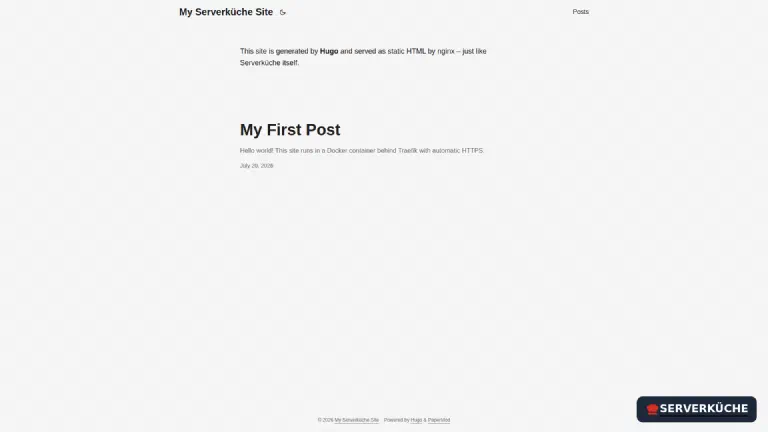
content="Hugo 0.165.0"The second command reads the generator meta tag – a nice proof that Hugo 0.165.0 really built the site. In the browser you now see your homepage:
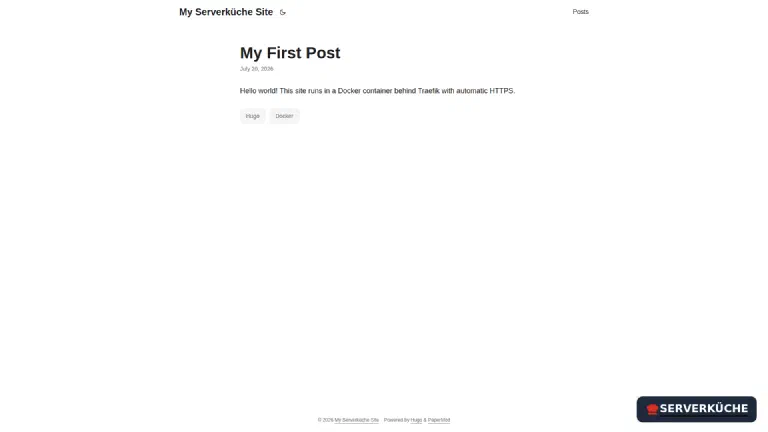
Clicking a post shows the rendered Markdown content with date and tags:
And a wrong URL doesn’t land on the nginx default page but on Hugo’s own 404 – thanks to error_page:
Step 8: Publishing new posts
Everyday use is dead simple: create a new Markdown file, rebuild:
cat > content/posts/second-post.md <<'EOF'
---
title: "Second Post"
date: 2026-07-21
---
Another post – online right after the rebuild.
EOF
docker compose up -d --build
Because the build takes only seconds and everything lives in the same folder, you can comfortably put this project into a Git repository (e.g. your Forgejo) and have the rebuild triggered automatically on every push by an Actions runner – that’s how Serverküche runs its own site.
When things go wrong
The container stays unhealthy. Almost always the IPv6 trap from step 4: the health check queries localhost but nginx only listens on IPv4. Switch to http://127.0.0.1/. Check with docker inspect --format '{{.State.Health.Status}}' CONTAINER.
Traefik shows 404 page not found (instead of your site). That’s the Traefik 404, not the nginx one – Traefik finds no matching router. Most common causes: the container isn’t healthy yet, the Host() rule has the wrong domain, or the proxy network isn’t external. See the 502/404 chapter in Understanding Docker networks.
All links and images are broken. The baseURL in hugo.toml doesn’t match the real domain. Hugo bakes absolute URLs based on this value – fix it and rebuild.
A post doesn’t appear. Check the date in the front matter: if it’s in the future, Hugo won’t build the post (see the warning box in step 3). A draft: true also hides content in a normal build.
theme "PaperMod" not found during the build. The theme folder is missing from the build context – usually because it’s a Git submodule that wasn’t copied, or a .dockerignore excludes it. Store the theme as a real folder as in step 1.
Your problem is not listed? Search all error messages →
Maintenance & backups
- Updates are relaxed. There’s no running software with security holes at runtime – only two pinned build blocks. Occasionally bump the Hugo tag (
hugomods/hugo:0.165.0) andnginx:1.31-alpineand rebuild; otherwise your normal update process handles it. Update the theme when needed with a freshgit clone. - The backup is trivial – but important. Your entire website is the project folder (Markdown,
hugo.toml, theme, Docker files). It belongs in a Git repository and/or your Restic backup. You don’t need to back up the generated HTML files – they’re regenerated from the source at any time. - No database risk. Because there’s no database and no login, the biggest maintenance burden of classic CMSes is gone. The only “state” of your site is the content you write yourself – versioned in Git, it’s both backup and change history.
Last updated: Sep 13, 2026
Send feedback: feedback@serverkueche.de
You might also like