Making Services Reachable Only Over VPN: Traefik + WireGuard + Internal DNS
A service that returns 403 from outside and works normally over VPN – same name, same valid certificate. IPAllowList, internal DNS and interface binding.
Table of contents
Not every service belongs on the open internet. An admin dashboard, a database interface, your
private wiki – all of it should be reachable, but only by you. The most convenient route there is
not “close the port” but a service that politely answers 403 from outside and works completely
normally over the VPN.
What are we building?
We take a service that already runs behind Traefik and lock it down against anything that does not come from the WireGuard network. Afterwards the same name returns 403 Forbidden from outside and 200 over the VPN – with the same valid Let’s Encrypt certificate, no port numbers in the address bar and no certificate warning.
Three building blocks combine to do that, and it pays to keep their roles apart:
- Traefik’s
IPAllowList– the actual protection. Anything not coming from10.8.0.0/24is rejected. - Internal DNS via AdGuard Home – pure convenience. It makes the name resolve to the VPN address inside the tunnel instead of taking a detour via the public IP.
- Binding to the VPN interface – the strictest level, for services that should not see a reverse proxy at all.
DNS is not protection
Host header by
hand and still reach your service. The protection comes exclusively from the allowlist or the
interface binding – DNS only makes it convenient.Requirements
- A running WireGuard VPN on the
10.8.0.0/24network, with the server holding10.8.0.1 - AdGuard Home on the same server, bound to
10.8.0.1:53 - Traefik as a reverse proxy with a working Let’s Encrypt resolver
- A service you want to keep internal. For practice,
traefik/whoamiis enough – it echoes every header it receives
VPS 1000 G12.5
4 vCores · 8 GB RAM · 128 GB SSD
from €14.50/month
VPN, DNS and reverse proxy fit together on one VPS 1000.
💶 1 month free:
Single use, valid for VPS 1000 G12.5. Redeem in the cart →
💶 €5.95 voucher for new netcup customers: always valid · not for domains or VPS Lite
Step by step
Step 1: Put the service behind the allowlist
The core is two extra labels on the container you want to protect. To follow along we use whoami,
because it prints every header it receives – that makes it immediately obvious later whether Traefik
uses the right source IP:
# /opt/vpnonly/compose.yaml
services:
  whoami:
    image: traefik/whoami:v1.12.0
    container_name: whoami
    restart: unless-stopped
    networks: [proxy]
    labels:
      - traefik.enable=true
      - traefik.http.routers.whoami.rule=Host(`YOUR_DOMAIN`)
      - traefik.http.routers.whoami.entrypoints=websecure
      - traefik.http.routers.whoami.tls.certresolver=le
      - traefik.http.routers.whoami.middlewares=vpn-only@docker
      - traefik.http.middlewares.vpn-only.ipallowlist.sourcerange=10.8.0.0/24
      - traefik.http.services.whoami.loadbalancer.server.port=80

networks:
  proxy:
    external: true
The two decisive lines are the fifth and sixth. One defines a middleware called vpn-only, the
other attaches it to the router. Both are required – more on that shortly.
cd /opt/vpnonly && docker compose up -dNote
ipwhitelist; since Traefik 3 it is ipallowlist. Older
guides on the internet lead you nowhere here – Traefik simply creates no middleware for an unknown
label and only mentions it in the log.Step 2: The counter-test – the same name twice
Without VPN, from any machine on the internet:
curl -s -o /dev/null -w "%{http_code}\n" https://YOUR_DOMAIN/403And with the WireGuard tunnel up. Here it matters which tunnel you use: in the split tunnel from
the WireGuard tutorial (AllowedIPs = 10.8.0.0/24) the name still points to the public IP. The
request then runs past the tunnel and also gets 403 – the internal DNS in step 3 fixes that. Until
then, tell curl by hand that the name should point to the server’s VPN address:
curl -s -o /dev/null -w "%{http_code}\n" --resolve YOUR_DOMAIN:443:10.8.0.1 https://YOUR_DOMAIN/200With a full tunnel (AllowedIPs = 0.0.0.0/0, ::/0) it works without --resolve too, because
then the path to the public IP also runs through the tunnel.
That is the whole trick. Both requests go to the same name, both get the same certificate – only
the source IP decides. As a cross-check, look at what whoami reports from inside the VPN:
curl -s --resolve YOUR_DOMAIN:443:10.8.0.1 https://YOUR_DOMAIN/ | grep -E "X-Real-Ip|X-Forwarded-For"X-Forwarded-For: 10.8.0.2
X-Real-Ip: 10.8.0.2Traefik sees the client’s VPN address, not the Docker network’s. That is no accident: when publishing a port, Docker performs a pure destination translation (DNAT) and leaves the source address untouched. This is why the allowlist works even though Traefik itself runs in a container.
Step 3: Internal DNS – so the name points the right way inside the VPN
With --resolve it works, but you can’t teach that to a browser. Without internal DNS the client
resolves the name to the public IP: in a split tunnel the request then ends up outside the VPN at the
403, in a full tunnel it takes a detour via the public address that breaks the moment you tighten
the public ports on the server.
A DNS rewrite in AdGuard Home takes care of it. Open the web interface, go to Filters → DNS rewrites and click “Add DNS rewrite”:
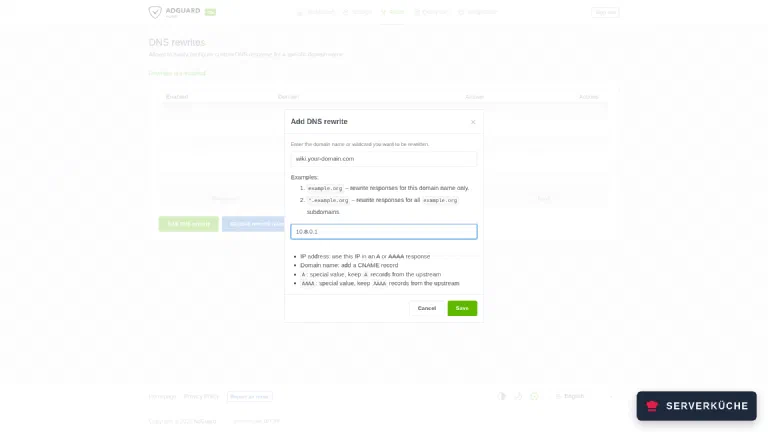
The upper field holds the service’s name, the lower one the server’s VPN address, that is
10.8.0.1. A leading *. works too if you want to redirect a whole subdomain at once. After
saving, the entry appears in the list:
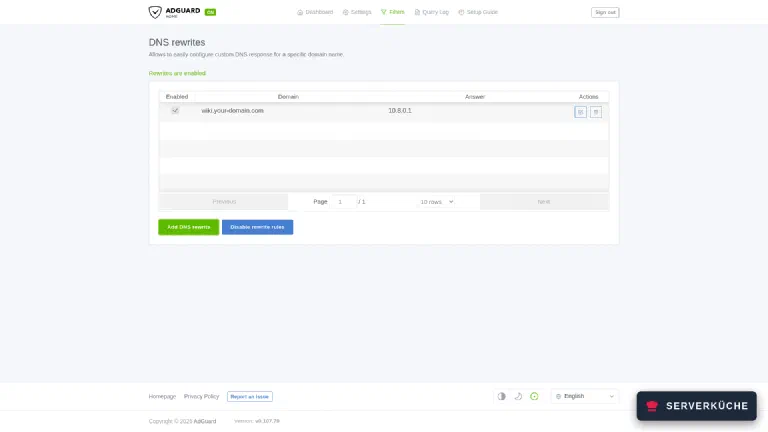
Check the result against the resolver directly. Before the entry it returns the public address:
dig +short @10.8.0.1 YOUR_DOMAIN203.0.113.10And after it:
dig +short @10.8.0.1 YOUR_DOMAIN10.8.0.1Conveniently, AdGuard also suppresses the AAAA answer: as long as you only create an IPv4 rewrite, the client gets no IPv6 address for that name at all and therefore cannot accidentally bypass the tunnel over IPv6. The IPv6 counter-check has to come back empty:
dig +short AAAA @10.8.0.1 YOUR_DOMAINStep 4: Hand the resolver to the clients
For the rewrite to take effect, the VPN clients have to actually use AdGuard. There is exactly one line for that in the WireGuard client configuration:
[Interface]
Address = 10.8.0.2/24
DNS = 10.8.0.1
PrivateKey = YOUR_PRIVATE_CLIENT_KEY
When the connection comes up, wg-quick registers the server as the resolver and removes it again
on disconnect:
wg-quick up wg0[#] wg setconf wg0 /dev/fd/63
[#] ip -4 address add 10.8.0.2/24 dev wg0
[#] ip link set mtu 1420 up dev wg0
[#] resolvconf -a wg0 -m 0 -xcat /etc/resolv.conf# Generated by resolvconf
nameserver 10.8.0.1The resolvconf -a wg0 line is the important part. If it is missing, wg-quick found no tool to
change the resolver configuration. A minimal Debian 13 has neither openresolv nor
systemd-resolved installed – without one of them DNS = has no effect and the rewrite never
applies.
Step 5: Why the public DNS record has to stay
It is tempting to delete the public A record as well. Do not, as long as Traefik obtains its
certificates via HTTP-01: Let’s Encrypt fetches
http://YOUR_DOMAIN/.well-known/acme-challenge/… from the outside for that. Without a public DNS
record and a reachable port 80, the next renewal attempt after 60 days fails – and you notice only
once the certificate has expired.
What matters is that the allowlist only hangs on the application router and not on ACME
handling: Traefik answers the challenge itself before any middleware applies. Requests from outside
still get 403 for everything else.
Be clear about one thing though: the name of your internal service is public knowledge regardless.
It is in DNS and additionally in the Certificate Transparency logs, which anyone can search. You
cannot hide the name – only the access. If that bothers you, you need wildcard certificates via the
DNS-01 challenge; then a single *.YOUR_DOMAIN entry ends up in the log and the individual
hostnames stay private.
Step 6: The stricter level – bind to the VPN interface
For services that do not need HTTPS from outside anyway, there is a stricter route: do not publish
the port publicly in the first place. Docker can bind any port to a specific address – and
10.8.0.1 is only reachable through the tunnel:
    ports:
      - "10.8.0.1:53:53/tcp"
      - "10.8.0.1:53:53/udp"
      - "10.8.0.1:8080:80/tcp"
Check what is actually being listened on:
ss -tlnp | grep -E ":8080|:53 "LISTEN 0 4096 10.8.0.1:53 0.0.0.0:* users:(("docker-proxy",pid=852377,fd=8))
LISTEN 0 4096 10.8.0.1:8080 0.0.0.0:* users:(("docker-proxy",pid=852401,fd=8))On the left is the concrete VPN address and not 0.0.0.0 – that is exactly the difference. Run the
counter-test on the server itself against its public IP. From another machine the netcup
firewall would reject port 8080 anyway, and the test would prove nothing:
curl -s -o /dev/null -w "%{http_code}\n" --max-time 5 http://YOUR_SERVER_IP:8080/000Not a 403 but no answer at all: there is nothing there to talk to. With "8080:80" instead of
"10.8.0.1:8080:80" the same request answers 200 – that’s how you see the binding makes the
difference. From the VPN, curl http://10.8.0.1:8080/ still returns 200.
When do you use which? Anything with a web interface that benefits from a reverse proxy (a nice name, a valid certificate, central middlewares) gets the allowlist. Anything only you operate and where raw protocols are involved – DNS, databases, admin ports, metrics endpoints – gets bound to the VPN interface directly. The two are not in conflict; they are two layers.
Tip
When it doesn’t work
Requests from outside still get 200 instead of 403. Almost always the middleware is defined but not attached to the router. The two labels have different jobs: traefik.http.middlewares.vpn-only.ipallowlist.sourcerange=… creates it, traefik.http.routers.YOURROUTER.middlewares=vpn-only uses it. Leave out the second line and everything starts without errors while the service sits wide open – with no error message whatsoever. The @docker suffix is optional as long as middleware and router come from the same provider.
Even from inside the VPN you get 403. Then Traefik sees a different source IP than the VPN client’s. Check with curl -s https://YOUR_DOMAIN/ | grep X-Real-Ip against a whoami container: if it shows a Docker-internal address such as 172.19.0.x or a CDN’s IP, there is another proxy in front. In that case you have to tell Traefik via forwardedHeaders.trustedIPs which predecessor it may believe – without that setting it does not evaluate the header at all.
Inside the VPN the name still resolves to the public IP. The client is not using AdGuard. Check cat /etc/resolv.conf first – if it does not say nameserver 10.8.0.1, then DNS = 10.8.0.1 did not take effect. wg-quick needs a tool that can change the resolver configuration: either resolvconf from the openresolv package or resolvectl from the systemd-resolved package. A minimal Debian 13 ships neither, and then the line does nothing. Whether AdGuard itself answers correctly is a separate check: dig +short @10.8.0.1 YOUR_DOMAIN.
The certificate suddenly stops renewing. The ACME fetch needs the public path. If you deleted the A record in the meantime, closed port 80, or accidentally applied the allowlist globally on the web entrypoint, Let’s Encrypt can no longer reach the challenge. docker compose logs traefik | grep -i acme shows the failure – but only shortly before expiry, not immediately.
The service answers inside the VPN, but only sometimes. That is usually address-family ordering: as long as the name still returns an AAAA answer, the client tries IPv6 first – and lands outside the tunnel on the 403. Create the DNS rewrite for IPv4 only; AdGuard then returns no AAAA for that name at all, and dig +short AAAA @10.8.0.1 YOUR_DOMAIN has to stay empty.
You put a public IPv6 address into the allowlist and still get 403. Traefik compares against the address it actually sees – and over IPv6 that is the bridge gateway’s, as long as the proxy network was created without IPv6. Your real address never enters the comparison. Check it with curl -s -6 https://YOUR_DOMAIN/ | grep X-Forwarded-For from the allowed network: if it says 172.x.x.x, recreate the proxy network with --ipv6 (see Reverse proxy with Traefik). For the VPN case in this tutorial it makes no difference, because WireGuard runs over IPv4 here.
Your problem is not listed? Search all error messages →
Maintenance & backups
The setup is pleasantly low-maintenance: the allowlist is two lines in a Compose file, and the DNS rewrite is one entry in AdGuard. There is nothing here that breaks on its own.
What you do have to keep an eye on:
- New services inherit nothing. Every additional container needs the middleware line on its own router. Put the two labels into your template, otherwise the next service sits open on the internet – and you will not notice, because everything works fine inside the VPN.
- The VPN subnet is now security-relevant. Whoever gets a WireGuard peer gets access to every
internal service. Remove retired devices from
wg0.confconsistently and check once a quarter withwg show wg0which peers actually had a recent handshake. - Certificates still travel the public path. After every change to the firewall, DNS or
entrypoints it is worth verifying that Traefik can still renew – easiest with a test request to
http://YOUR_DOMAIN/.well-known/acme-challenge/test, which has to return404and not403.
There is little to back up here, but that little matters: the Compose files with the labels,
/etc/wireguard/ including the keys, and the AdGuard directory with AdGuardHome.yaml, which holds
the rewrites. All three belong in your Restic backup.
Realistic effort: set it up once, then just remember two lines for every new service. The quarterly ritual with the peer list takes five minutes.
Send feedback: feedback@serverkueche.de
You might also like