Jitsi Meet: Your Own Video Conferences Without Zoom
Jitsi Meet in four containers behind Traefik: a moderator login instead of open rooms, the UDP port everything fails on, and what the video really costs.
Table of contents
A video conference on your own server is the point where self-hosting stops being comfortable: four containers, one UDP port and a handful of traps that all surface only once the first guest cannot hear anybody.
What are we building?
We run Jitsi Meet stable-11248-3 as four containers behind Traefik: the web interface, the XMPP server, the conference control and the video bridge. At the end you open a room in the browser, and nobody but you can start a conference. Guests only get in once you are there as the moderator.
Deliberately left out: dial-in by phone (Jigasi), recording (Jibri) and Etherpad. Each of those is a service of its own with its own requirements; anyone adding them builds on the stack set up here.
One port that does not go through the proxy
Requirements
- Debian 13 with Docker and the Compose basics
- A running reverse proxy with Traefik and a domain connected to the server
- UDP port 10000 reachable from outside, both in the UFW firewall and as a policy of its own in the netcup firewall; a web template with 80/443 is not enough for it
- The public IPv4 address of your server; you enter it by hand in a moment
VPS 2000 G12.5
8 vCores · 16 GB RAM · 256 GB SSD
from €26.92/month
Idle, the stack uses just under 400 MB. The demand grows with every participant though – in CPU, not in memory.
💶 1 month free:
Single use, valid for VPS 2000 G12.5. Redeem in the cart →
💶 €5.95 voucher for new netcup customers: always valid · not for domains or VPS Lite
Step by step
Step 1: Why there are four containers
Jitsi is a group of several services. Four parts, four jobs:
web      nginx + the web interface        HTTP  – behind Traefik
prosody  XMPP server, accounts and rooms  internal
jicofo   conference control, distributes  internal
jvb      video bridge – audio and video   UDP 10000 – straight at the server
prosody holds the user accounts and the signalling; your browser talks to it over a WebSocket.
jicofo decides who is a moderator and which bridge a conference gets. jvb is the video
bridge: it takes in the audio and video streams of all participants and passes them on.
The most important part of that is the last line. The video bridge does not sit behind Traefik. WebRTC needs UDP with low latency; an HTTP proxy has no business there. Traefik serves the web interface over 443, and in parallel your browser sends audio and video to UDP 10000 at the same address.
Step 2: The images no longer come from Docker Hub
Copy a guide that uses the Docker Hub images and you fetch a version several months old:
# On Docker Hub jitsi/web has stopped – the last stable tag is from June.
# The only maintained source now is the GitHub registry:
docker pull ghcr.io/jitsi/web:stable-11248-3
Jitsi now publishes its images under ghcr.io/jitsi. On Docker Hub the series ends in June
2026 at stable-11031; since then stable-11146 (August) and stable-11248 (September) have been
released, both on GitHub only. Fixes within a release get a suffix: stable-11248-3 is the third
revision of stable-11248. The version is not in the image name but in the tag, and it is the same for all four
containers. Never mix versions: jicofo and jvb speak a protocol that changes between releases.
Step 3: The configuration
Jitsi is configured entirely through environment variables. Create the folder and generate the three secrets first:
mkdir -p /opt/jitsi && cd /opt/jitsi
openssl rand -hex 16   # run three times – for JICOFO_AUTH_PASSWORD,
                       # JVB_AUTH_PASSWORD and JICOFO_COMPONENT_SECRET
Those three values are the internal passwords jicofo and jvb use to log in to prosody. They go
into the .env:
# /opt/jitsi/.env
PUBLIC_URL=https://YOUR_DOMAIN
TZ=Europe/Berlin

XMPP_DOMAIN=meet.jitsi
XMPP_AUTH_DOMAIN=auth.meet.jitsi
XMPP_GUEST_DOMAIN=guest.meet.jitsi
XMPP_MUC_DOMAIN=muc.meet.jitsi
XMPP_INTERNAL_MUC_DOMAIN=internal-muc.meet.jitsi
XMPP_SERVER=xmpp.meet.jitsi
XMPP_BOSH_URL_BASE=http://xmpp.meet.jitsi:5280

JVB_BREWERY_MUC=jvbbrewery
JICOFO_AUTH_USER=focus
JVB_AUTH_USER=jvb
JVB_PORT=10000
JVB_ADVERTISE_IPS=YOUR_SERVER_IP

JICOFO_AUTH_PASSWORD=YOUR_FIRST_SECRET
JVB_AUTH_PASSWORD=YOUR_SECOND_SECRET
JICOFO_COMPONENT_SECRET=YOUR_THIRD_SECRET

ENABLE_AUTH=1
ENABLE_GUESTS=1
AUTH_TYPE=internal
Two blocks deserve an explanation.
The meet.jitsi domains are purely internal and have nothing to do with your real domain. They
exist only between the containers; you do not have to enter anything in DNS for them. Leave them
unchanged. The default values are identical across every Jitsi guide out there, and that helps when
you are searching for a problem.
JVB_ADVERTISE_IPS is the public IPv4 address of your server, and it is mandatory. Left to
itself the video bridge only knows its container address (172.x.x.x) and would announce exactly
that to every browser, an address nobody on the internet can reach. Jitsi does try to find out the
real address through a STUN service, but you cannot rely on it: after start-up the bridge’s log
says stunDiscoveryFailed=true. Whether the variable takes effect is shown by a different line,
which you look at in step 6.
The .env is the backup
.env is lost, jicofo and jvb no longer get past
prosody, and the only way back is to set all three anew and recreate the containers. Put the file
on chmod 600 and into your backup.Step 4: The stack
# /opt/jitsi/compose.yaml
services:
  web:
    image: ghcr.io/jitsi/web:stable-11248-3
    container_name: jitsi-web
    restart: unless-stopped
    volumes:
      - ./config/web:/config:Z
    environment:
      - PUBLIC_URL
      - TZ
      - ENABLE_AUTH
      - ENABLE_GUESTS
      - XMPP_DOMAIN
      - XMPP_AUTH_DOMAIN
      - XMPP_MUC_DOMAIN
      - XMPP_INTERNAL_MUC_DOMAIN
      - XMPP_BOSH_URL_BASE
      - DISABLE_HTTPS=1
      - ENABLE_HTTP_REDIRECT=0
      - ENABLE_LETSENCRYPT=0
    networks:
      meet.jitsi:
      proxy:
    labels:
      - traefik.enable=true
      - traefik.docker.network=proxy
      - traefik.http.routers.jitsi.rule=Host(`YOUR_DOMAIN`)
      - traefik.http.routers.jitsi.entrypoints=websecure
      - traefik.http.routers.jitsi.tls.certresolver=le
      - traefik.http.services.jitsi.loadbalancer.server.port=8000

  prosody:
    image: ghcr.io/jitsi/prosody:stable-11248-3
    container_name: jitsi-prosody
    restart: unless-stopped
    expose: ['5222', '5347', '5280']
    volumes:
      - ./config/prosody/config:/config:Z
      - ./config/prosody/prosody-plugins-custom:/prosody-plugins-custom:Z
      - ./config/prosody/data:/var/lib/prosody:Z
    environment:
      - PUBLIC_URL
      - TZ
      - ENABLE_AUTH
      - ENABLE_GUESTS
      - AUTH_TYPE
      - XMPP_DOMAIN
      - XMPP_AUTH_DOMAIN
      - XMPP_GUEST_DOMAIN
      - XMPP_MUC_DOMAIN
      - XMPP_INTERNAL_MUC_DOMAIN
      - JICOFO_AUTH_USER
      - JICOFO_AUTH_PASSWORD
      - JICOFO_COMPONENT_SECRET
      - JVB_AUTH_USER
      - JVB_AUTH_PASSWORD
    networks:
      meet.jitsi:
        aliases:
          - xmpp.meet.jitsi

  jicofo:
    image: ghcr.io/jitsi/jicofo:stable-11248-3
    container_name: jitsi-jicofo
    restart: unless-stopped
    depends_on: [prosody]
    volumes:
      - ./config/jicofo:/config:Z
    environment:
      - TZ
      - ENABLE_AUTH
      - AUTH_TYPE
      - XMPP_DOMAIN
      - XMPP_AUTH_DOMAIN
      - XMPP_INTERNAL_MUC_DOMAIN
      - XMPP_MUC_DOMAIN
      - XMPP_SERVER
      - JICOFO_AUTH_USER
      - JICOFO_AUTH_PASSWORD
      - JICOFO_COMPONENT_SECRET
      - JVB_BREWERY_MUC
    networks:
      meet.jitsi:

  jvb:
    image: ghcr.io/jitsi/jvb:stable-11248-3
    container_name: jitsi-jvb
    restart: unless-stopped
    depends_on: [prosody]
    ports:
      - '10000:10000/udp'
    volumes:
      - ./config/jvb:/config:Z
    environment:
      - TZ
      - PUBLIC_URL
      - XMPP_AUTH_DOMAIN
      - XMPP_INTERNAL_MUC_DOMAIN
      - XMPP_SERVER
      - JVB_AUTH_USER
      - JVB_AUTH_PASSWORD
      - JVB_BREWERY_MUC
      - JVB_PORT
      - JVB_ADVERTISE_IPS
    networks:
      meet.jitsi:

networks:
  meet.jitsi:
  proxy:
    external: true
Three lines deserve an explanation:
loadbalancer.server.port=8000: The nginx inside thewebcontainer runs unprivileged and therefore listens on 8000, not on 80. Enter 80 and Traefik answers502 Bad Gatewayeven though all four containers are running.DISABLE_HTTPS=1andENABLE_LETSENCRYPT=0: Jitsi ships its own certificate handling, which we do not want. TLS is Traefik’s job../config/prosody/data:/var/lib/prosody: This is where the user accounts live. The official template mounts the directory underconfig/storage/prosody; anyone putting the Compose file together themselves easily forgets it. Then your moderator account is gone after the nextdocker compose down.
Step 5: Create the directories for the right user
The containers run as the user s6 with UID 1000, not as root. They write their generated
configuration into the mounted folders, and that only works if those belong to them:
mkdir -p /opt/jitsi/config/{web,prosody/config,prosody/prosody-plugins-custom,prosody/data,jicofo,jvb}
chown -R 1000:1000 /opt/jitsi/config
Skip the chown and the web container does start, but stays empty:
cp: cannot stat '/config/.': Permission deniedThe official examples leave the step out because nobody there works as root: anyone creating the
folders under their own account has UID 1000 anyway. On a server where you work as root in /opt,
you have to do it yourself.
Step 6: Start and check
cd /opt/jitsi
docker compose up -d
docker compose ps --format '{{ .Name }}\t{{ .Status }}'jitsi-jicofo Up 45 seconds
jitsi-jvb Up 45 seconds
jitsi-prosody Up 45 seconds
jitsi-web Up 45 secondsFour running containers do not yet mean they have found each other. The proof for that is in the
jicofo log, where the video bridge has to show up:
docker compose logs jicofo | grep "Added new videobridge"BridgeSelector.addJvbAddress#99: Added new videobridge:
Bridge[jid=jvbbrewery@internal-muc.meet.jitsi/07751be8e24f, version=2.3.318-gbf271b11f, ...]If that line is missing, jvb and jicofo are talking past each other. Usually that is because the
passwords in the .env were changed after the first start. Whether the bridge knows its public
address is shown by its own log:
docker compose logs jvb | grep "static mapping"MappingCandidateHarvesters.initialize: Adding a static mapping:
StaticMapping(localAddress=172.19.0.4, publicAddress=YOUR_SERVER_IP, …)If your public IPv4 shows up there, JVB_ADVERTISE_IPS has arrived. You can then ignore the
stunDiscoveryFailed=true a few lines further down. After that you check the web interface
and the signalling path from outside:
curl -s -o /dev/null -w "%{http_code}\n" https://YOUR_DOMAIN/
curl -s -o /dev/null -w "%{http_code}\n" https://YOUR_DOMAIN/http-bind200
200The second call is the more important one: /http-bind is the path your browser uses to talk to
prosody. A 404 here means Traefik passed the page through but not the API.
Step 7: The moderator account
With ENABLE_AUTH=1 and ENABLE_GUESTS=1 the rule is: only someone who logs in may open a
room; after that anyone with the link may join. Without this setting your instance is open to
everyone who knows the address, including the bandwidth that gets used up.
You create the account directly in prosody:
docker exec jitsi-prosody prosodyctl --config /run/prosody/config/prosody.cfg.lua \
register YOUR_USERNAME meet.jitsi 'YOUR_PASSWORD'usermanager info User account created: YOUR_USERNAME@meet.jitsiNote the path: at runtime the configuration lives under /run/prosody/config/, not under /config.
With the obvious --config /config/prosody.cfg.lua, Prosody reports “Prosody was unable to find the configuration file” instead.
The domain is meet.jitsi, the internal one from the .env and not your real one. Logging in
later still happens with the username alone, without a domain.
Step 8: The first meeting
Open your domain. You land on the start page, which suggests a random room name:
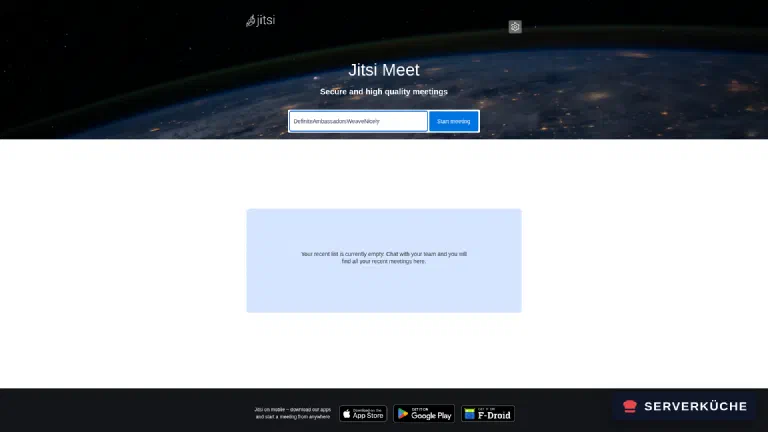
The room name becomes part of the URL (https://YOUR_DOMAIN/CookingNight), and whoever knows the URL
gets into the room. So do not pick anything guessable like test or meeting. After the click
you land in the pre-join room, where Jitsi checks camera and microphone:
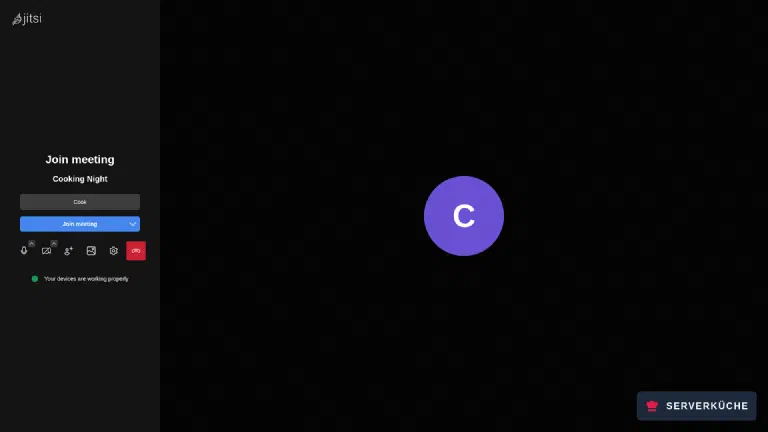
Now comes the part that would look different without authentication. Because no moderator is in the room yet, the conference stays closed:
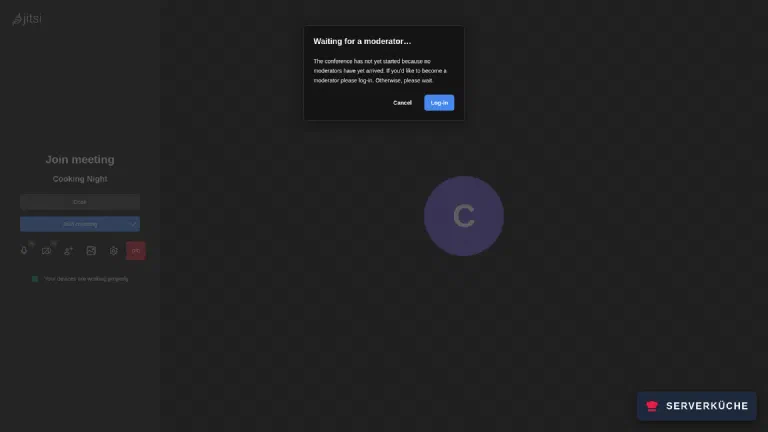
Through “Log-in” you enter the username and password from step 7. After that you are in the room, with an “M” next to your own name for “moderator”:
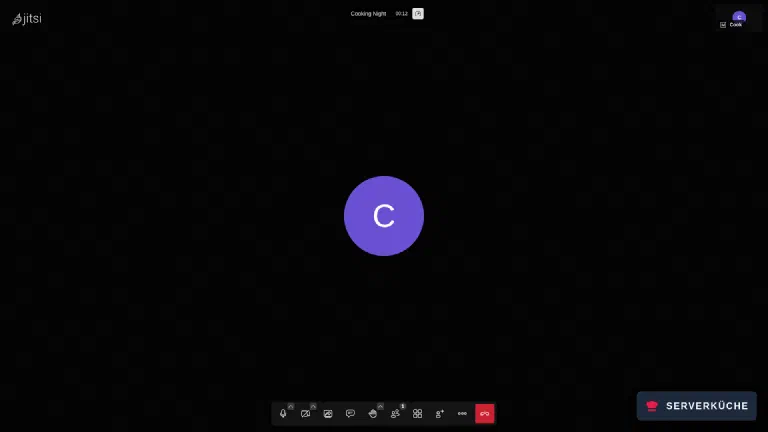
From now on guests come in over the same link, without an account. Leave the room as the last moderator and the conference is over.
Step 9: The UDP port
The web interface works long before the media path does, which is why a closed UDP port only shows up once several people are inside. Check that the server is listening on 10000:
ss -lunp | grep 10000UNCONN 0 0 0.0.0.0:10000 0.0.0.0:* users:(("docker-proxy",pid=173295,fd=8))
UNCONN 0 0 [::]:10000 [::]:* users:(("docker-proxy",pid=173302,fd=8))Then open it, in both firewalls. On the server:
ufw allow 10000/udp comment 'Jitsi Videobridge'With two people you are not testing the port at all
With exactly two participants Jitsi builds a direct connection between the browsers (P2P) and leaves the video bridge out entirely. The complete media stream of a two-person call then goes over a direct candidate pair: not a single byte goes through UDP 10000. Only from the third participant onwards does the bridge take over.
So anyone trying out a fresh instance with two people is testing exactly the path that is not
the one that breaks later. Bring in a third person for the test or switch P2P off
temporarily. Putting ENABLE_P2P=0 into the .env is not enough: Compose only passes on the
variables listed under the service’s environment. Add the line - ENABLE_P2P to the web
service, set ENABLE_P2P=0 in the .env and restart with docker compose up -d web; then the
two-person call goes over the bridge as well. Whether it took effect is shown by
curl -s https://YOUR_DOMAIN/config.js | grep -A1 "config.p2p". It has to say enabled: false.
And a policy of its own in the netcup SCP. This is the step that goes missing most often, because without it Jitsi looks entirely normal: the web interface arrives over 443 and is long since covered by your web policy, the room opens, the participant list fills up, and only once somebody speaks does anyone notice that nothing arrives.
Under “Firewall Policys → Create firewall policy” create a template Jitsi with exactly one rule
and assign it to the server in addition to your existing templates:
Direction          INBOUND
Action             ACCEPT
Protocol           UDP
Source port        –
Destination port   10000
Why this does not happen by itself: the netcup firewall is stateless for UDP. It does not remember that your server is currently sending media and therefore does not let the replies back in automatically. This path needs an explicit inbound rule. The procedure and how to assign templates are in setting up the netcup firewall in the SCP.
One firewall is not enough
When it doesn’t work
Traefik answers with 502 Bad Gateway even though all four containers are running. The nginx inside the web container listens on port 8000, not on 80, because it runs unprivileged. Set traefik.http.services.jitsi.loadbalancer.server.port=8000. You can look it up with docker exec jitsi-web ss -lnt; the port actually in use is right there. The same error appears when traefik.docker.network=proxy is missing and Traefik picks up the container address from the internal meet.jitsi network, which it cannot reach itself.
The web container starts but reports cp: cannot stat '/config/.': Permission denied and serves nothing. The mounted folders under /opt/jitsi/config belong to root while the containers run as UID 1000. A chown -R 1000:1000 /opt/jitsi/config and a restart fix it. On hardened servers with umask 027 this hits you every time, because newly created folders then get 0750.
With two people everything works, from the third participant on nobody hears or sees anything. That is the classic picture of a closed UDP port. It only surfaces now, because Jitsi runs two-person calls directly between the browsers and only uses the video bridge from three participants onwards. Check ss -lunp | grep 10000 on the server and the inbound ACCEPT rule for UDP 10000 in both firewalls. The bridge’s logs show it too: docker compose logs jvb | grep -i 'ICE state' then shows transitions to Terminated without a connection ever being established.
Everyone is in the room, but nobody hears or sees anybody. That is almost always the media path, not the conference. Check docker compose logs jvb | grep "static mapping" first. If there is no line with your public address, JVB_ADVERTISE_IPS is missing from the .env and the video bridge announces its container address to the browsers. If the address is right, the next suspect is UDP 10000 in the firewall, in both of them (the one on the server and the one at the provider). In the netcup SCP that means a policy of its own with an inbound ACCEPT rule on UDP 10000; a web template covering 80/443 does not include it.
After docker compose down the moderator account is gone. Prosody stores accounts under /var/lib/prosody, and that directory is not mounted in the official template: the accounts disappear along with the container. The mount ./config/prosody/data:/var/lib/prosody:Z fixes it; afterwards the accounts live on the host under config/prosody/data/data/meet%2ejitsi/accounts/. An account that is already lost is simply created again.
The “Waiting for a moderator” dialog stays up even after logging in. Then the account does not exist in the domain Jitsi looks in. Registration happens against meet.jitsi, the internal domain from the .env, not your real one. Check with docker exec jitsi-prosody prosodyctl --config /run/prosody/config/prosody.cfg.lua register NAME meet.jitsi PASSWORD: if the command reports “User already exists”, the domain is right and the password is wrong.
Your problem is not listed? Search all error messages →
Maintenance & backups
Updates arrive as one package. Jitsi puts out a new stable tag every few weeks, and all four
images carry the same one:
cd /opt/jitsi
sed -i 's/stable-11248-3/stable-NEW_VERSION/g' compose.yaml
docker compose pull && docker compose up -d
docker compose logs jicofo | grep "Added new videobridge"
The last command is the acceptance test: if the line does not appear, something shifted between control and bridge during the update. You find the current tag at the docker-jitsi-meet releases, not on Docker Hub, whose state lags months behind.
What you have to back up is little, but it counts:
/opt/jitsi/.env                 # the three secrets
/opt/jitsi/config/prosody/data  # the moderator accounts
Everything else under config/ is regenerated from the environment variables on every start. Your
own edits to those files are gone after the next restart. If you really want to change something
about the interface, create a custom-config.js for it; everything else belongs in the .env. Both
paths together are a few kilobytes and fit into any Restic backup.
Resource use is unremarkable at first. Idle, the stack uses just under 400 MB:
jitsi-web       14 MB
jitsi-prosody   22 MB
jitsi-jicofo   146 MB
jitsi-jvb      191 MB
That stays similar under load; what grows is the CPU load and the bandwidth of the video bridge. It forwards the streams without re-encoding them, but every additional participant means more packets. A small VPS is enough for a handful of people; from roughly a dozen simultaneous cameras onwards the uplink becomes the topic, not the memory.
Realistically, it is once a month a look for a new stable tag and an update that costs ten
minutes. Nothing happens in between: Jitsi has no database that grows and no media that piles up.
The one appointment you should make for yourself is a short test call after every update, before the
first real meeting is due.
Send feedback: feedback@serverkueche.de
You might also like