Keeping your whole Docker stack safely up to date
Update discipline for your Docker stack: pin versions, get notified about updates with Diun, apply them safely, clean up – instead of blind auto-updates.
Table of contents
A self-hosted stack is never “done”. Container images get security updates, apps get new features – and whoever doesn’t keep up eventually runs vulnerable software. This recipe turns “I should update sometime” into a reliable routine: informed, controlled and with a safety net.
What are we building?
Not a tool, but update discipline for your entire Docker stack. By the end you have:
pinned versions (never latest again), an update notifier (Diun) that tells you
when something new is available, a safe rollout routine with a backup beforehand
and a rollback plan – and a cleanup rhythm so old images don’t clutter your disk. Tested
with Diun v4.33.0 on Docker 29 / Compose v5.3.
The guiding idea is deliberately not “update everything automatically”. With stateful apps (databases, Nextcloud, Immich) an unattended update in the middle of the night can trigger a migration that goes wrong – and nobody is there. The safe way is: pin → get notified → apply deliberately → verify. We treat blind auto-updates honestly at the end (step 6): they have their place, but a small one.
Prerequisites
- Basic knowledge of Docker Compose – you should
be able to read tags, volumes and
compose.yaml. - A running stack you want to maintain (e.g. the apps behind your reverse proxy).
- A working backup strategy with Restic – it’s the safety net that makes updates relaxed in the first place.
VPS 2000 G12.5
8 vCores · 16 GB RAM · 256 GB SSD
from €26.92/month
A well-maintained multi-app stack including databases feels noticeably happier on the VPS 2000.
💶 1 month free:
Single use, valid for VPS 2000 G12.5. Redeem it in an empty cart – the code adds the server itself. Redeem in the cart →
💶 €5 voucher for new netcup customers: always valid · not for domains or VPS Lite
Step by step
Step 1: Never latest again – pin versions deliberately
The most common mistake appears in countless guides: image: nextcloud:latest. The
problem: latest is a moving target. A docker compose pull can pull you a new major
version with breaking changes at any time, unasked – you never know what you’re running,
and a rollback is barely possible.
Pin every service to a fixed tag instead. Two sensible levels:
- Major tag (
postgres:18,nextcloud:34-apache): automatically gets patch and minor updates of the same major version on the nextpull, but never a major jump. A good compromise for most services. - Exact version (
vaultwarden/server:1.37.2): full control, nothing changes without your involvement. Ideal for delicate, stateful apps.
What you’re running right now is shown by Compose per project:
cd ~/YOUR_APP && docker compose imagesCONTAINER REPOSITORY TAG PLATFORM IMAGE ID SIZE CREATED
diun-demo-whoami traefik/whoami v1.11.0 linux/amd64 200689790a0a 3.04MB 17 months agoIf latest appears anywhere in the TAG column, that’s your first candidate to pin.
Enter the specific tag into the compose.yaml – that’s the foundation for everything
else.
Which version is currently stable you look up at the source, not by gut feeling: the tags overview on Docker Hub (or GHCR) of the image, or the release notes on GitHub. For official images this also works via API:
curl -s "https://hub.docker.com/v2/repositories/library/postgres/tags/?page_size=20" | grep -oE '"name":"[0-9.]+"'Take the highest stable version of the same series you want to run – pre-releases
(rc, beta) stay out.
Step 2: See what’s outdated – the update notifier Diun
Pinning means updates no longer come on their own. So you need someone to let you know when a new image is available. That’s exactly what Diun (Docker Image Update Notifier) does – it updates nothing, it only watches and notifies. Give it its own folder:
mkdir -p ~/diun && cd ~/diunThe compose.yaml:
services:
  diun:
    image: crazymax/diun:4.33.0
    command: serve
    environment:
      - "TZ=Europe/Berlin"
      - "DIUN_WATCH_SCHEDULE=0 8 * * *"          # daily at 8 a.m.
      - "DIUN_PROVIDERS_DOCKER=true"
      - "DIUN_PROVIDERS_DOCKER_WATCHBYDEFAULT=false"
    volumes:
      - ./data:/data
      - /var/run/docker.sock:/var/run/docker.sock:ro
restart: unless-stoppedDIUN_PROVIDERS_DOCKER=truelets Diun discover your running containers via the Docker socket.WATCHBYDEFAULT=falsemeans Diun only watches containers you explicitly mark – so you don’t get a flood about things that don’t interest you.DIUN_WATCH_SCHEDULEis a cron expression; once a day is plenty and spares the registry rate limits.
The Docker socket is not a harmless read access
:ro, and that sounds reassuring – but it’s only half
true. The :ro merely prevents the file docker.sock from being overwritten; through
the Docker API behind it you can still do anything: start containers with --privileged,
mount the host filesystem, in short root on the host. Whoever has access to the
socket is practically root-equivalent – regardless of the :ro. For a pure notifier
like Diun this is a deliberately accepted risk; if you want to defuse it, don’t attach
Diun directly to the socket, but to an upstream
docker-socket-proxy that only
passes through the few endpoints (list containers, read images) Diun really needs.Mark the containers Diun should keep an eye on via a label in their compose.yaml:
    labels:
      - "diun.enable=true"
      - "diun.watch_repo=true"
diun.enable=true switches on monitoring. diun.watch_repo=true lets Diun search the
whole repository for newer tags (e.g. whether a 19 already exists for your
postgres:18) – without this label, Diun only checks whether your exact tag got a new
image. Start Diun and watch the first run:
docker compose up -d && docker compose logs -f diunINF Found 1 image(s) to analyze provider=docker
INF New image found image=docker.io/traefik/whoami:v1.11.0 provider=docker
INF New image found image=docker.io/traefik/whoami:v1.12.0 provider=docker
INF New image found image=docker.io/traefik/whoami:latest-arm64 provider=docker
INF Jobs completed added=97 failed=0 skipped=0 unchanged=0 updated=0The first run is just the inventory: Diun writes every tag it finds into its database as
“New image found” (added). That one watched container yields 97 entries is down to
watch_repo – Diun then fetches the manifest for every tag in the repository, including
architecture variants like latest-arm64 or v1.10.0-armv7.
Two things follow from this that are easy to get wrong:
The first run does not notify. The option
watch.firstCheckNotifdefaults tofalse, and that applies per image tag. Everything Diun sees for the first time lands in the database silently. It only reports once something changes later on.watch_repocosts registry requests. 97 manifest queries per run almost blow the Docker Hub limit without a login (100 requests per IPv4 address or IPv6/64subnet) on their own. On the second run of the same day our test ran straight into it –StatusCode: 429andfailed=36in the log. How much budget is left – and which window the registry is currently counting in – it tells you itself:TerminalTOKEN=$(curl -s "https://auth.docker.io/token?service=registry.docker.io&scope=repository:ratelimitpreview/test:pull" | cut -d'"' -f4) curl -sI -H "Authorization: Bearer $TOKEN" https://registry-1.docker.io/v2/ratelimitpreview/test/manifests/latest | grep -i "^ratelimit"Ausgaberatelimit-limit: 100;w=3600 ratelimit-remaining: 98;w=3600wis the window width in seconds. Docker documents a six-hour window; our test VPS consistently gotw=3600, i.e. one hour, in August 2026. So rely on the header rather than on a remembered number – and note that this query itself costs a request. Beyond that, narrow the tags down to what you actually care about – real release tags:
    labels:
      - "diun.enable=true"
      - "diun.watch_repo=true"
      - "diun.include_tags=^v1\\.1[12]\\.\\d+$$"
      - "diun.sort_tags=semver"
include_tags is a regular expression. Two pitfalls hide in the notation: the backslashes have
to be doubled in YAML, and the trailing $ is written as $$ – otherwise Compose tries to
substitute an environment variable. With this label, exactly the two real release tags remain
out of the 97 entries:
INF Found 1 image(s) to analyze provider=docker
INF New image found      image=docker.io/traefik/whoami:v1.11.0 provider=docker
INF New image found      image=docker.io/traefik/whoami:v1.12.0 provider=docker
INF Jobs completed       added=2 failed=0 skipped=0 unchanged=0 updated=0
So that the notice doesn’t just sit in the log, you attach a notification. Diun can
do email, Telegram, ntfy, Gotify and many more. For Telegram – you may already have set
up the bot in the Uptime Kuma tutorial – two
lines in the environment block are enough:
      - "DIUN_NOTIF_TELEGRAM_TOKEN=YOUR_BOT_TOKEN"
      - "DIUN_NOTIF_TELEGRAM_CHATIDS=YOUR_CHAT_ID"
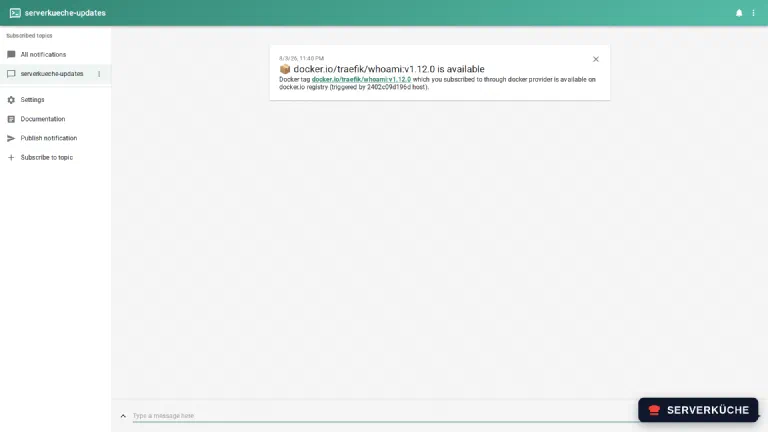
All other channels are in the Diun documentation. This is what the notice looks like – here via ntfy in the browser, as soon as a newer version appears for one of your pinned images:
Test the notification without waiting for weeks
DIUN_WATCH_FIRSTCHECKNOTIF=true in Diun’s environment once,
delete ./data and restart: then Diun sends notifications for the inventory too – exactly one
per tag found. Channel verified, remove the variable again afterwards (otherwise the next
watch_repo run floods your inbox).Step 3: Apply an update safely (the routine)
Diun reports an update – now comes the actual discipline. Never just pull blindly. The fixed order for every service:
1. Read the release notes. On a major jump (e.g. Nextcloud 34 → 35) this is mandatory: are there breaking changes, migration steps, removed options? Two minutes here save hours of debugging.
2. Back up first. An update is the classic moment for something to break. Make a Restic backup of the data (for big jumps, additionally a netcup snapshot). Then a failure is only a setback, not data loss.
3. Bump the tag and pull. Set the new tag in the compose.yaml and fetch the image:
docker compose pull Image traefik/whoami:v1.12.0 Pulled4. Restart. Compose only replaces the affected container, the volumes stay:
docker compose up -d Container diun-demo-whoami Recreated
Container diun-demo-whoami Started5. Verify. Does the container run cleanly (docker compose ps, docker compose logs),
and does the app still do what it should? Stateful apps may now run a database migration –
take a look at the log until it’s through.
6. Have a rollback in mind. If something goes wrong, set the tag in the compose.yaml
back to the old version and do docker compose up -d again. Because your data lives in the
volume (not in the container), for most apps this is a clean step back. Only if the new
version has already migrated the database does a tag rollback no longer help – then you
need the backup from step 2. That’s exactly what it’s for.
One app at a time
Step 4: Don’t forget the base – host, engine, hidden images
Your apps are only half the battle. Equally important:
Operating system & Docker engine. The OS and security packages of Debian you best install automatically with unattended-upgrades. The Docker engine is deliberately left out of that: unattended-upgrades by default only pulls the Debian sources (
origin=Debian), not the Docker APT repo (origin=Docker,download.docker.com). So the engine isn’t updated in the background and won’t unexpectedly restart all your containers at night – because an engine update briefly takes running containers down. You’d better determine that moment yourself and update the engine specifically by hand when it fits:Terminalsudo apt update && sudo apt upgrade docker-ce docker-ce-cli containerd.io docker-buildx-plugin docker-compose-pluginAfterwards check with
docker compose psthat all stacks are up again.If a brief container restart at night doesn’t bother you, you can also let the engine come along with unattended-upgrades: allow the Docker repo in
/etc/apt/apt.conf.d/50unattended-upgradesas an additional origins pattern. What matters isarchive=– the Docker repo sets noCodenamefield, the often-recommendedcodename=${distro_codename}would run into the void and Docker would stay out despite the entry:INI"origin=Docker,archive=${distro_codename}";Hidden images. Many stacks contain databases, caches and helper services (
postgres,redis,mariadb,gotenberg…) that nobody thinks of. Diun watches them automatically as soon as the respective container carries thediun.enablelabel – so give it to all long-lived services, not just the visible main app.Extensions of your reverse proxy. Pinned plugin versions too (e.g. the CrowdSec bouncer) or Traefik itself want to be updated deliberately.
Step 5: Clean up – reclaim storage
Every update leaves the old image behind. After a few months this adds up. What you’re using is shown by:
docker system dfTYPE TOTAL ACTIVE SIZE RECLAIMABLE
Images 26 4 14.75GB 14.16GB (95%)
Containers 4 4 45.06kB 0B (0%)
Local Volumes 0 0 0B 0B
Build Cache 36 0 828.2MB 828.2MBUnused, untagged (“dangling”) images are removed by the safe default command:
docker image pruneCareful: this only removes dangling images. An old, still tagged version (like
whoami:v1.11.0 after the update to v1.12.0) doesn’t count as dangling and stays behind.
You reclaim that specifically:
docker rmi traefik/whoami:v1.11.0Untagged: traefik/whoami:v1.11.0
Deleted: sha256:200689790a0a0ea48ca45992e0450bc26ccab5307375b41c84dfc4f2475937abWhoever wants to clean up more radically uses docker image prune -a (removes all
images no running container currently uses). That’s powerful, but pulls everything anew on
the next start – use it deliberately, not in cron.
The safe docker image prune -f (dangling only), on the other hand, you can run regularly
without worry – e.g. weekly via a systemd timer or cron. That way no junk piles up between
your update sessions in the first place, and you reclaim the storage automatically.
Step 6: Auto-update – when it’s okay (and when not)
The question remains: why not everything fully automatic? The best-known tool for that is Watchtower – it pulls new images and restarts containers on its own. Two catches:
- The upstream is orphaned. The official
containrrr/watchtowerhasn’t had a release since v1.7.1 (2023-11-11) – and the repository was archived at the end of 2025 (2025-12-17), i.e. mothballed for good. Whoever uses it better reaches for a maintained fork likenickfedor/watchtower. - Auto-update is dangerous for stateful apps. Lifting a database or Nextcloud over a major jump unattended at night is the opposite of “safe”.
Auto-update makes sense at most for uncritical, stateless services – and even then
rather in monitor mode (WATCHTOWER_MONITOR_ONLY=true), which only reports instead of
updating. For everything else, the deliberate routine from step 3 beats any automation
tool. That’s exactly why Diun (notify) + manual update is the recommendation here, not
Watchtower (act).
Safe automation for Git users: Renovate
compose.yaml files live in a Git repo, there’s a third way that combines
automation and control: Renovate (or Dependabot) detects the pinned image: tags and
automatically opens a pull request that bumps the tag – complete with a link to the
release notes. So the update doesn’t happen secretly on the server, but as a change you
review and merge before rolling it out with docker compose up -d. That way the safe
“apply deliberately” step is preserved, only the tedious checking is gone.When things go wrong
docker compose pull pulls no new image, even though a new version exists. Your tag
points to a fixed version (:1.37.2) or to a major tag (:18), under which there’d only be
a new major. pull only fetches what the same tag now points to. For a version jump
you have to bump the tag in the compose.yaml yourself.
The app no longer starts after the update or throws database errors. Usually a breaking
change or a failed migration. Check docker compose logs, compare with the release notes.
Set the tag back to the old version and up -d; if the new version already migrated the
data, restore the backup from step 3.
Diun reports nothing, even though updates exist. Check that the containers carry the
label diun.enable=true and Diun can read the socket (DIUN_PROVIDERS_DOCKER=true, socket
mounted). For newer version tags the container additionally needs diun.watch_repo=true
– without it, Diun only sees changes to the exactly pinned tag. And: whatever Diun sees for the
first time is only written to the database, not reported (watch.firstCheckNotif is
false) – to test the notification path, set DIUN_WATCH_FIRSTCHECKNOTIF=true once.
The disk fills up, even though you regularly run docker image prune. docker image prune only clears dangling images, not the old tagged versions. Remove them
specifically with docker rmi <image>:<tag> or – with care – docker image prune -a. The
build cache (docker builder prune) can grow too.
On pulling you get toomanyrequests / a Docker Hub rate limit. diun.watch_repo=true
on many images queries many tags. Set the watch interval less often (e.g. once daily) and
narrow with diun.include_tags to relevant versions instead of scanning the whole repo.
Your problem is not listed? Search all error messages →
Maintenance & backups
- The rhythm. Diun reports → you read the release notes → backup → update → verify. In practice that’s a manageable appointment once a month; critical security holes you patch immediately. Honestly: safe self-hosting doesn’t work entirely without manual work – but 15 minutes a month is the deal.
- Fast movers first. Some projects release frequently and with breaking changes – Immich, mailcow, CrowdSec, Grafana and Nextcloud. Those you look at first and more often, quiet candidates (databases, Redis) less so.
- Backups are the core of this recipe. An update without a backup is a gamble; with Restic at your back, every update becomes relaxed. Before big jumps, additionally a snapshot – it brings the whole server back in one go.
- Version your
compose.yamlfiles. Whoever keeps their Compose files in a Git repo can roll back not only data but also the configuration to any earlier state – and sees in the history exactly which tag was bumped when. - Keep the tools up to date too. Diun itself and your reverse-proxy plugins belong in the update round as well – otherwise the maintainer doesn’t maintain itself.
Last updated: Sep 9, 2026
Send feedback: feedback@serverkueche.de
You might also like