Outline: The Modern Team Wiki with an Authentik Login
Outline 1.12 with Postgres 18 behind Traefik – sign-in exclusively through Authentik, local file storage instead of S3, and the OIDC trap that kills the login.
Table of contents
Outline is the rare wiki that feels like Notion and still runs entirely on your own server. The price for that shows up at the very first start: there is no sign-in with a username and password. Without an identity provider you cannot get in, not even as the administrator.
What are we building?
We run Outline 1.12.0 with PostgreSQL 18.6 and Redis 8.10.3 behind Traefik. Sign-in goes through Authentik 2026.8.5 over OpenID Connect, and uploaded files live in a Docker volume instead of an S3 bucket.
At the end you have a wiki that only lets in people who have an account in Authentik. It needs no cloud service at all.
Outline has no passwords
Requirements
- A running Authentik as single sign-on, where you already have an administrator and access to the admin interface
- A reverse proxy with Traefik
- Two names that both point at the server:
wiki.YOUR_DOMAINfor Outline andauth.YOUR_DOMAINfor Authentik - About 60 minutes, half of it inside the Authentik interface
VPS 2000 G12.5
8 vCores · 16 GB RAM · 256 GB SSD
from €26.92/month
Outline uses around 340 MB, database and Redis together a good 100 MB – plus the Authentik next to it at a good gigabyte.
💶 1 month free:
Single use, valid for VPS 2000 G12.5. Redeem in the cart →
💶 €5.95 voucher for new netcup customers: always valid · not for domains or VPS Lite
Step by step
Step 1: Create the access in Authentik
Sign in to Authentik and go to Applications → Providers → Create in the admin area. Pick OAuth2/OpenID Provider and enter:
Name                  Outline
Authorization flow    default-provider-authorization-implicit-consent
Client type           Confidential
Redirect URI          https://wiki.YOUR_DOMAIN/auth/oidc.callback   (Strict)
Signing Key           authentik Self-signed Certificate
Subject mode          Based on the User's Email
Grant types           Authorization Code, Refresh Token
Two fields decide whether the login will work later. The redirect URI has to match character for
character: Outline always calls https://wiki.YOUR_DOMAIN/auth/oidc.callback, with no trailing
slash and no other path. Anything else and Authentik aborts the sign-in with invalid_request.
Grant types must also contain Authorization Code. In Authentik 2026.x that is a field of its
own; leave it empty and the configuration looks complete while the sign-in still fails
immediately. The log then says Invalid grant_type for provider.
Subject mode “Based on the User’s Email” makes Outline tie accounts to the mail address. That matters if you ever switch identity providers: the address survives, an internal user ID does not.
Then create the application under Applications → Applications → Create: name Outline, slug
outline, and the provider you just made. The provider page now shows the Client ID and
Client Secret, which you need in a moment.
You can have Authentik confirm the finished configuration itself:
curl -s https://auth.YOUR_DOMAIN/application/o/outline/.well-known/openid-configuration \
| python3 -m json.tool | head -6{
"issuer": "https://auth.YOUR_DOMAIN/application/o/outline/",
"authorization_endpoint": "https://auth.YOUR_DOMAIN/application/o/authorize/",
"token_endpoint": "https://auth.YOUR_DOMAIN/application/o/token/",
"userinfo_endpoint": "https://auth.YOUR_DOMAIN/application/o/userinfo/",
"end_session_endpoint": "https://auth.YOUR_DOMAIN/application/o/outline/end-session/",Those four addresses go into Outline unchanged.
Step 2: Outline’s configuration
Outline is configured through an .env. Generate the two keys first:
mkdir -p /opt/outline && cd /opt/outline
openssl rand -hex 32 # twice: for SECRET_KEY and UTILS_SECRET# /opt/outline/.env
NODE_ENV=production
URL=https://wiki.YOUR_DOMAIN
PORT=3000
SECRET_KEY=YOUR_FIRST_KEY
UTILS_SECRET=YOUR_SECOND_KEY
POSTGRES_PASSWORD=YOUR_DB_PASSWORD
DATABASE_URL=postgres://outline:YOUR_DB_PASSWORD@db:5432/outline
PGSSLMODE=disable
REDIS_URL=redis://redis:6379
FILE_STORAGE=local
FILE_STORAGE_LOCAL_ROOT_DIR=/var/lib/outline/data
FILE_STORAGE_UPLOAD_MAX_SIZE=26214400
OIDC_CLIENT_ID=FROM_AUTHENTIK
OIDC_CLIENT_SECRET=FROM_AUTHENTIK
OIDC_AUTH_URI=https://auth.YOUR_DOMAIN/application/o/authorize/
OIDC_TOKEN_URI=https://auth.YOUR_DOMAIN/application/o/token/
OIDC_USERINFO_URI=https://auth.YOUR_DOMAIN/application/o/userinfo/
OIDC_LOGOUT_URI=https://auth.YOUR_DOMAIN/application/o/outline/end-session/
OIDC_USERNAME_CLAIM=preferred_username
OIDC_DISPLAY_NAME=Authentik
OIDC_SCOPES=openid profile emailSECRET_KEYencrypts field contents in the database and signs sessions. Change it later and every sign-in is invalid and encrypted fields are unreadable. It belongs in the backup and is never touched again.FILE_STORAGE=localsaves you an S3-compatible store. For a team wiki that is perfectly enough; the files end up in a Docker volume.PGSSLMODE=disableis needed because the database runs without TLS on the internal network. Without the line Outline tries an encrypted connection, getsThe server does not support SSL connectionsand restarts in a loop.OIDC_DISPLAY_NAMEis only the label on the sign-in page.
chmod 600 /opt/outline/.envStep 3: The stack
# /opt/outline/compose.yaml
services:
  db:
    image: postgres:18.6-alpine
    container_name: outline-db
    restart: unless-stopped
    environment:
      POSTGRES_USER: outline
      POSTGRES_PASSWORD: ${POSTGRES_PASSWORD}
      POSTGRES_DB: outline
    volumes:
      - pgdata:/var/lib/postgresql
    networks: [outline-intern]
    healthcheck:
      test: ["CMD-SHELL", "pg_isready -U outline"]
      interval: 10s
      timeout: 5s
      retries: 6

  redis:
    image: redis:8.10.3-alpine
    container_name: outline-redis
    restart: unless-stopped
    networks: [outline-intern]
    healthcheck:
      test: ["CMD", "redis-cli", "ping"]
      interval: 10s
      timeout: 5s
      retries: 6

  outline:
    image: outlinewiki/outline:1.12.0
    container_name: outline
    restart: unless-stopped
    depends_on:
      db:
        condition: service_healthy
      redis:
        condition: service_healthy
    env_file: .env
    volumes:
      - storage:/var/lib/outline/data
    networks: [outline-intern, proxy]
    labels:
      - traefik.enable=true
      - traefik.docker.network=proxy
      - traefik.http.routers.outline.rule=Host(`wiki.YOUR_DOMAIN`)
      - traefik.http.routers.outline.entrypoints=websecure
      - traefik.http.routers.outline.tls.certresolver=le
      - traefik.http.services.outline.loadbalancer.server.port=3000

volumes:
  pgdata:
  storage:

networks:
  outline-intern:
    internal: true
  proxy:
    external: true
The database and Redis sit in a network with internal: true and are unreachable from outside and
from the proxy network. The database mount is on /var/lib/postgresql, not on
/var/lib/postgresql/data: from PostgreSQL 18 onwards the container refuses to start with the old
path.
For the file store we deliberately use a named volume and not a folder from the host. Outline
runs inside the container as the user nodejs with UID 1001; with a bind mount you would have to
set the permissions yourself, with a volume Docker handles it.
Step 4: Start and check
cd /opt/outline
docker compose up -d
docker compose logs -f outline
On first start Outline creates the database and runs its migrations. It takes a good minute until
the container reports (healthy):
{"label":"database","level":"info","message":"Migrated 20261012120000-add-owner-id-to-collections.js in 0.011s"}
{"label":"plugins","level":"info","message":"OIDC endpoints mounted with manual configuration"}
{"label":"plugins","level":"info","message":"OIDC plugin registered"}
{"label":"lifecycle","level":"info","message":"Listening on http://localhost:3000 / https://wiki.YOUR_DOMAIN"}
The two plugins lines are the acceptance test for sign-in: Outline only registers the module at
all if the OIDC variables are complete. If one is missing, Outline still starts, but then has no
way to sign in whatsoever.
Check from outside only once docker compose ps shows (healthy) for outline.
That takes a good minute after the start, and while the healthcheck is still running Traefik skips
the container: curl then fails on the certificate, because Traefik only serves its own
TRAEFIK DEFAULT CERT.
curl -s -o /dev/null -w "%{http_code}\n" https://wiki.YOUR_DOMAIN/
curl -s -o /dev/null -w "%{http_code} -> %{redirect_url}\n" https://wiki.YOUR_DOMAIN/auth/oidc200
302 -> https://auth.YOUR_DOMAIN/application/o/authorize/?response_type=code&redirect_uri=…The second line is the important one: Outline assembles that redirect from your settings. A wrong
address there comes from the .env, not from Authentik.
Step 5: The first sign-in
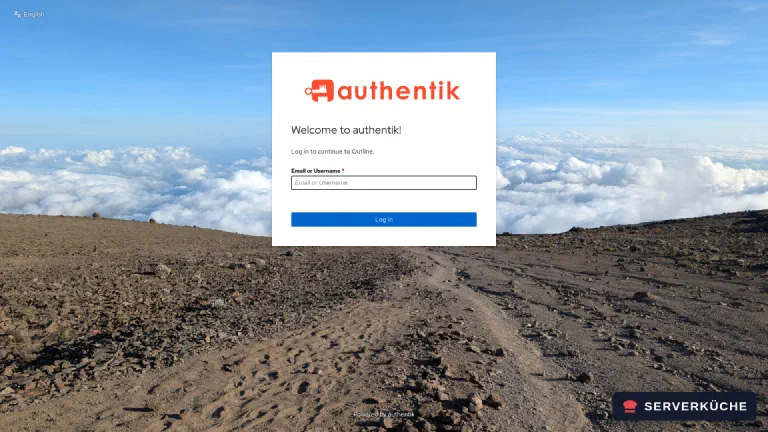
Open https://wiki.YOUR_DOMAIN/. Because Authentik is the only configured identity provider,
Outline no longer shows a sign-in page of its own and forwards you straight through:
After signing in you land in Outline. The first user automatically becomes the administrator, and the workspace is created along with an example collection you can delete later:
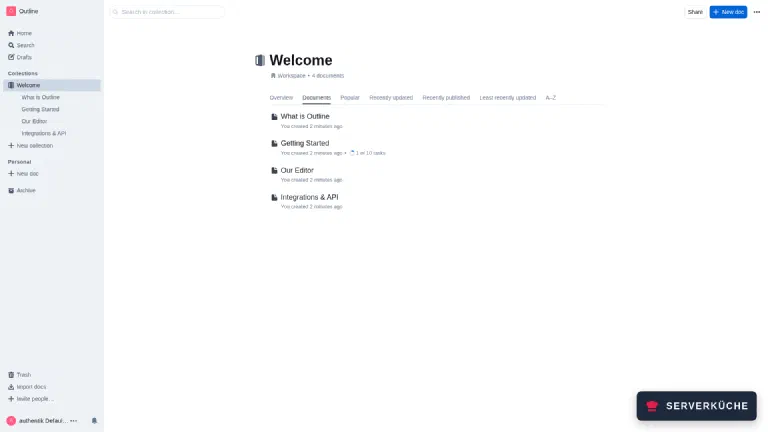
Below the collections sits the Personal section. Every account can create documents there that only it can see and that it can share with others on purpose, a private notepad next to the shared wiki.
Whoever signs in first owns the wiki
Step 6: Documents and files
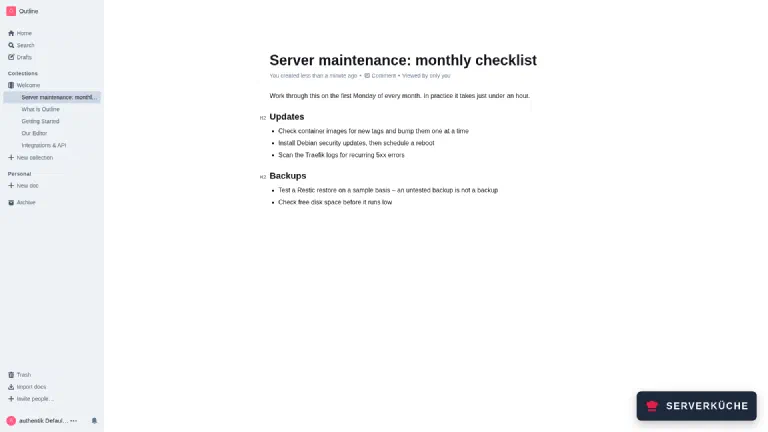
You create a document with New doc. Outline understands Markdown as you type: ## becomes a
heading, - a list:
With FILE_STORAGE=local, uploaded images and attachments end up in the volume. After an upload you
find them like this:
docker exec outline find /var/lib/outline/data -type f | head -3/var/lib/outline/data/uploads/fbc65b45-…/f633c516-…/punkt.pngThe files live under random identifiers; anyone who does not know the URL will not find them. They
are only served through /api/attachments.redirect, and that checks permissions.
Step 7: Security settings before anyone else joins
Under Settings → Security there are four switches you should touch before the first invitation:
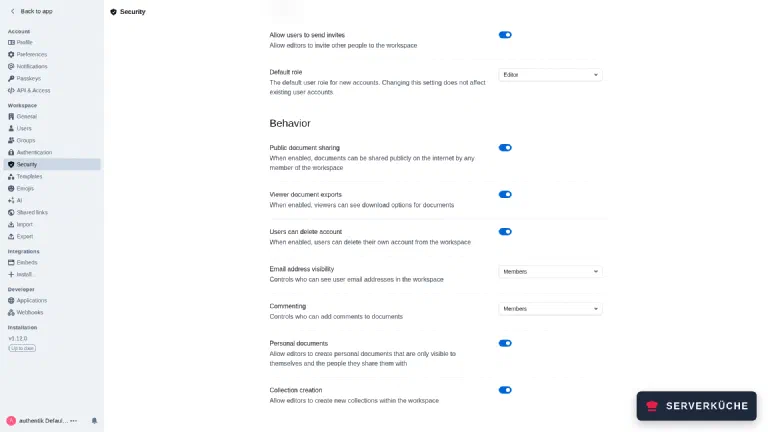
Default role is set to Editor. Everyone who signs in through Authentik may write immediately.
For a mixed team Viewer is the better default; you then grant write access deliberately.
Public document sharing lets every member put a document on the open internet behind a link. That is convenient and a data leak in one switch; turn it off unless you explicitly need it.
Allow users to send invites gives members the right to bring in more people. With SSO that decision is better kept in Authentik than in the wiki.
Personal documents sits further down and enables the private documents from step 5. For a team wiki that is a trade-off, because private really means private here: even as the administrator you cannot open someone else’s personal document. You only get “No access to this doc” and the option to request access. Search does not find it, and an export of the whole workspace leaves it out. In plain text it exists only in the database and therefore in your backup. If knowledge should always end up in the shared part, turn the switch off before the first invitation: it only prevents new personal documents, existing ones stay with their authors.
The bottom left shows the running version (v1.12.0) along with whether it is current. There is
no quicker way to check your update status.
When it doesn’t work
The sign-in bounces straight back and Outline shows “Authentication failed”. Look at Authentik’s logs: docker compose logs server | grep -i grant. If it says Invalid grant_type for provider, the provider’s Grant types field is empty. In Authentik 2026.x Authorization Code has to be listed there explicitly; otherwise the sign-in aborts with invalid_request before the login mask even appears. Outline only logs OAuth error during authentication: The request is otherwise malformed – the actual cause is always on the Authentik side.
After signing in you get redirect_uri back as an error. The address stored in Authentik has to be exactly https://wiki.YOUR_DOMAIN/auth/oidc.callback, with the same name that URL= in Outline’s .env names. A different hostname, an extra slash or http instead of https is enough for a rejection. With matching mode Strict there is no leeway – that is the point.
Outline shows no sign-in page any more and jumps straight to Authentik. That is not a fault: with exactly one configured identity provider Outline skips its own selection page. As soon as you set up a second route it comes back. If you want to see the page, call it with a notice parameter, for example after a failed attempt.
Uploads fail when you bind a host folder instead of using the volume. Outline runs inside the container as nodejs with UID 1001 and cannot write into a root-owned folder – on hardened servers with umask 027 even less so. Either stay with the named volume, or run chown -R 1001:1001 on the directory. You can check with docker exec outline ls -la /var/lib/outline/data.
Outline starts, but nobody can sign in, and the log is missing the line OIDC plugin registered. Then at least one of the six OIDC_ variables is empty. Outline does not report this as an error – it simply starts without a sign-in route. Check with docker exec outline env | grep OIDC whether all values arrive; a common cause is a $ in the client secret, which Compose expands under environment:. With env_file: as used here that does not happen.
Your problem is not listed? Search all error messages →
Maintenance & backups
Updates are unremarkable because the migrations run automatically at start:
cd /opt/outline
docker compose exec -T db pg_dump -U outline outline > before-update-$(date +%F).sql
sed -i 's/outline:1.12.0/outline:NEW_VERSION/' compose.yaml
docker compose pull && docker compose up -d
docker compose logs outline --tail 20
The pg_dump beforehand is not a ritual: migrations only run one way, and a step back to an older
version is not possible afterwards. Outline publishes a new minor version roughly monthly.
Three things have to go into the backup:
/opt/outline/.env                 # SECRET_KEY and UTILS_SECRET, without them the DB is useless
pg_dump output                    # documents, collections, accounts
volume outline_storage            # uploaded images and attachments
The SECRET_KEY is the critical part: the database alone is worth nothing without it. You back up
the volume with
docker run --rm -v outline_storage:/data -v /tmp:/backup alpine \
  tar czf /backup/outline-files.tar.gz -C /data .
All of it belongs encrypted in your Restic backup.
Resource use is modest and steady:
outline         341 MB
outline-db       77 MB
outline-redis    27 MB
The database grew to 12 MB with a few documents. What really costs memory is the Authentik next to it. Reckon with a good gigabyte for the identity provider alone and size the VPS accordingly.
The effort in operation: one update a month with a dump beforehand, about fifteen minutes. Nothing happens in between. Outline has no background jobs that get out of hand, and the file store only grows as fast as your team inserts images. The one thing to keep an eye on is the user list: someone deleted in Authentik still exists as an account in Outline and has to be deactivated there separately.
Send feedback: feedback@serverkueche.de
You might also like