Stalwart or Mailcow? Two mail servers, both set up
One container or eighteen? Both mail servers really set up and compared: effort, RAM, attack surface – and what Mailcow really costs next to Traefik.
Table of contents
We set up both: Mailcow on 10 August, Stalwart the day after, both on the same test VPS. This article isn’t a third recipe – it answers the question that comes before them: which of the two do you take?
The answer doesn’t hang on a feature list. It hangs on an architectural decision that carries a price tag.
What are we building?
Nothing – we’re deciding. By the end of this article you’ll know which of the two mail servers to set up, and why the other one would be wrong for your case.
The starting position in numbers, measured rather than guessed:
| Stalwart | Mailcow | |
|---|---|---|
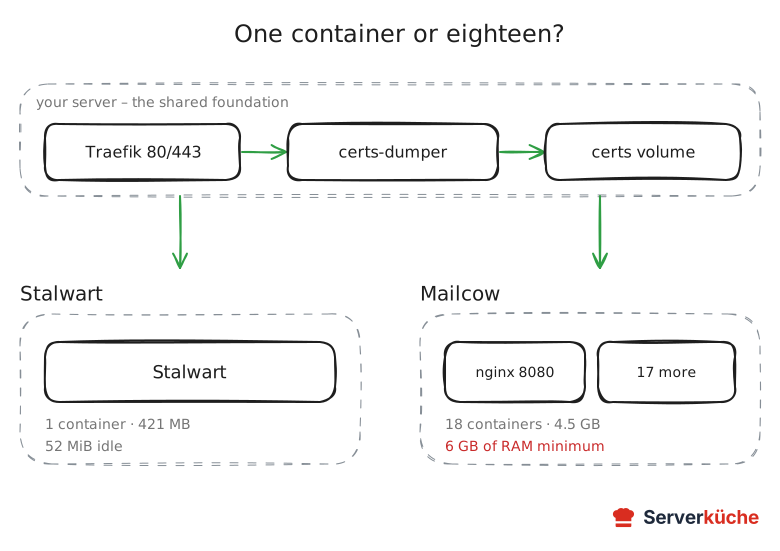
| Containers | 1 | 18 |
| Images on disk | 407 MB | around 4.5 GB |
| RAM | 46 MiB idle | 6 GB set as the minimum |
| Recommended server | VPS 1000 (8 GB) | VPS 2000 |
| Behind a Traefik | one volume, one object | five switches, restart hook |
| Webmail in the browser | no | yes (SOGo) |
| Licence | AGPL-3.0 + commercial | GPL-3.0 |
The sentence everything comes down to sits in the third row. Both can be put behind the shared Traefik – that is not what tells them apart, even though you often read otherwise. What tells them apart is the price: Stalwart is one container next to everything else and makes do with 46 MiB when idle. Mailcow is eighteen, and its minimum of 6 GB of RAM has to be there on top of everything else the machine already runs.
That isn’t a recommendation against Mailcow. It’s the sum you should do before deciding – because more often than not it ends at a second server for 14 to 27 euros a month.
Which versions are in here
Prerequisites
For this article you need exactly one thing: a domain whose DNS you control yourself. We deliberately do not assume a running server – if you’re reading this, you’re still deciding.
Two things apply to both solutions equally, so they’re no help in telling them apart – but they will cost you time either way:
- Deliverability. Whether your mail arrives or lands in spam is decided by PTR, SPF, DKIM and DMARC – not by the software. That’s the subject of the recipe on email deliverability, and it’s the real reason running your own mail server is work.
- Outbound SMTP. At netcup the default policy “netcup Mail block” blocks ports 25, 465 and 587 outbound. You take it off the server yourself in the SCP, without a support ticket – see netcup firewall setup.
Step by step
Each of the following steps is one dimension of the decision. If one of them settles it for you, you can skip the rest – the table in step 6 pulls everything together.
Step 1: The architecture – one container or eighteen
Stalwart is a single process written in Rust. That one binary contains SMTP, IMAP, POP3, JMAP, CalDAV, CardDAV, WebDAV, Sieve, a spam and phishing filter, and the data store (RocksDB). The image is correspondingly small:
docker pull stalwartlabs/stalwart:v0.16.25
docker image ls stalwartlabs/stalwartREPOSITORY TAG SIZE
stalwartlabs/stalwart v0.16.25 407MBIdling – freshly started, without mailboxes – the container used 46 MiB of RAM at 0 % CPU. Take that as a floor, not an operating figure: with real mailboxes the RocksDB cache and the spam classifier’s training data grow, and the full-text index comes on top. The order of magnitude holds all the same, and it’s the reason Stalwart runs alongside a server that already does something else.
Mailcow is the opposite, and deliberately so. The stack consists of 18 services, taken from
the project’s own docker-compose.yml:
unbound        mysql          redis          clamd
rspamd         php-fpm        sogo           dovecot
postfix        postfix-tlspol memcached      nginx
acme           netfilter      watchdog       dockerapi
olefy          ofelia
That list isn’t bloat, it’s the bill for the feature set. sogo is the webmail including calendar,
clamd and olefy are virus scanner and macro checker, unbound a DNS resolver of its own,
watchdog and ofelia handle monitoring and cron jobs. Each of these parts is a mature,
specialised tool, and Postfix and Dovecot are among the best-seasoned server programs there are.
The difference isn’t quality, it’s the number of moving parts you answer for. With Stalwart it’s one.
Step 2: What it costs to move in next to a reverse proxy
There’s a claim here that we carried for a long time ourselves: that Mailcow cannot run behind a shared Traefik because its own nginx occupies ports 80 and 443. That only holds for the default configuration. Mailcow documents the way around it explicitly – you bind its nginx to a local port and take the certificate off it:
HTTP_BIND=127.0.0.1
HTTP_PORT=8080
HTTPS_BIND=127.0.0.1
HTTPS_PORT=8443
SKIP_LETS_ENCRYPT=y
AUTODISCOVER_SAN=n
So both can sit behind the same proxy. The difference is what it costs you.
With Mailcow it’s the six switches above, three Traefik routers (the UI, autoconfig,
autodiscover) – and one detail you have to know about: Postfix and Dovecot only read their
certificate at start-up. The dumper therefore has to restart them after every renewal:
certdumper:
  image: ghcr.io/kereis/traefik-certs-dumper:1.8.28
  command: --restart-containers mailcowdockerized-postfix-mailcow-1,mailcowdockerized-dovecot-mailcow-1
  environment:
    DOMAIN: mail.YOUR_DOMAIN   # writes cert.pem/key.pem flat, the way Mailcow expects them
  volumes:
    - /opt/traefik/:/traefik:ro
    - /var/run/docker.sock:/var/run/docker.sock:ro
    - ./data/assets/ssl:/output:rw
Two things deliberately differ from mailcow’s own template. The container names there
(mailcow_postfix-mailcow_1) come from the old Compose v1; current Docker names the containers
mailcowdockerized-…-1, and with the old names the dumper finds nothing to restart. And it needs
the Docker socket to be allowed to restart anything at all.
On top of that, mailcow marks this page as “community supported” – it carries a warning box. That’s not a dealbreaker, but it is a difference from a path the vendor carries itself.
Two things stay true regardless:
- The mail ports 25, 465, 587, 143, 993, 110, 995 and 4190 remain directly on the host – for both solutions equally.
- On hosts with IPv6,
generate_config.shcreates an/etc/docker/daemon.jsonand restarts Docker immediately. On a shared server that restart takes everything else down with it. It happens once, during setup – but it happens.
And then there’s the point that usually decides it in practice and has nothing to do with ports: 6 GB of RAM as the minimum, with ClamAV rather 8. You need that on top of everything already running on the machine. A VPS 1000 with 8 GB is effectively full at that point. That’s why people do end up on a second server for Mailcow – not because it couldn’t work otherwise, but because the memory runs out.
Stalwart, at 46 MiB idle, moves in alongside. There seems to be a catch: Stalwart fetches its Let’s Encrypt certificate via TLS-ALPN-01 on port 443 by default, and your proxy has had that port for ages. There’s a clean solution for it, and it’s written up in Stalwart’s own documentation: Stalwart stops fetching a certificate at all and gets it from Traefik instead.
In between sits a tiny container that writes certificate and key out of Traefik’s acme.json
into a shared volume:
services:
  traefik-certs-dumper:
    image: ghcr.io/kereis/traefik-certs-dumper:1.8.28
    restart: always
    command: --restart-containers stalwart
    environment:
      OVERRIDE_UID: 2000      # Stalwart runs as uid 2000 in the container
      OVERRIDE_GID: 2000
    volumes:
      - /opt/traefik/:/traefik:ro      # where acme.json lives in the Traefik recipe
      - /var/run/docker.sock:/var/run/docker.sock:ro
      - certs:/output
The dumper looks for acme.json directly under /traefik. So you mount the directory that holds
Traefik’s acme.json – in the Traefik recipe that’s
/opt/traefik/. If the path is off, Docker silently creates an empty directory, the dumper only
logs /traefik/acme.json is not a file. Retrying..., and Stalwart never gets a certificate.
Those two OVERRIDE lines are not decoration: the dumper writes key.pem with permissions
0640, and Stalwart runs as uid 2000 inside the container. Without handing over ownership it
can’t get at its own key.
Stalwart mounts the same volume read-only (certs:/data/certs:ro), needs the fixed name
container_name: stalwart for the restart, attaches to the web interface
with the usual Traefik labels, and publishes the mail ports directly on the container. In the
setup wizard you turn off “Automatically Obtain TLS Certificate” – otherwise Stalwart keeps
trying to get one itself. Then, in the console under Settings → TLS → Certificates, you point
at the two files – in the interface the types are called Text value read from file and
Secret read from file:
{
  "certificate": { "@type": "File", "filePath": "/data/certs/mail.YOUR_DOMAIN/cert.pem" },
  "privateKey":  { "@type": "File", "filePath": "/data/certs/mail.YOUR_DOMAIN/key.pem" }
}
Stalwart lists the certificate right away, but only serves it after a restart
(docker compose restart stalwart). Until then a mail client still gets the self-signed
placeholder CN=rcgen self signed cert.
That’s also why the dumper carries --restart-containers stalwart: Stalwart reads the files only
at start-up. When Traefik renews the certificate, the dumper writes the new files and restarts
Stalwart – a matter of seconds. Without that line Stalwart would keep running with the old
certificate after the first renewal until it expires 90 days later. The Docker socket is full
access to Docker even with :ro – which puts the dumper in the same trust class as Traefik, which
has the socket too. The console action Reload → TLS certificates would be the alternative, but
in the Community Edition it answered API error 403 for us.
This is more elegant than the DNS-01 challenge you might reach for first: you need no API credentials at your DNS provider, and the host keeps a single ACME client – the one you’re running anyway.
We rebuilt this on the test VPS, alongside the Traefik running there permanently, and simulated
a renewal: Traefik writes acme.json, the dumper follows and restarts Stalwart. Stalwart then
serves, on its own mail ports, the certificate it never requested – here the handshake on the
IMAPS port:
subject=CN=mail.YOUR_DOMAIN
issuer=C=US, O=Let's Encrypt, CN=YR2
Verify return code: 0 (ok)What still stays on the server
tls.passthrough, but then you additionally need the Proxy Protocol so Stalwart sees the real
sender IP. Publishing the ports on the container is simpler.VPS 2000 G12.5
8 vCores · 16 GB RAM · 256 GB SSD
from €26.92/month
If the choice falls on Mailcow: this is the second server it needs – 16 GB lets ClamAV run along too.
💶 1 month free:
Single use, valid for VPS 2000 G12.5. Redeem it in an empty cart – the code adds the server itself. Redeem in the cart →
💶 €5 voucher for new netcup customers: always valid · not for domains or VPS Lite
If it’s going to be Stalwart and you have no server at all yet, one size down is enough; the plans are in the netcup overview, and what your particular setup needs is estimated by the server calculator.
Step 3: Effort during setup and in operation
The figures from the two recipes speak for themselves: Stalwart is done in roughly 60 minutes and seven steps and is rated Intermediate, Mailcow takes about 90 minutes, eight steps, and counts as an Advanced topic.
What comes afterwards is more interesting. An update looks like this with Stalwart:
cd /opt/stalwart
docker compose pull && docker compose up -d
And like this with Mailcow:
cd /opt/mailcow-dockerized
sudo ./update.sh
The script pulls in the compose file, updates all images and restarts the stack. It takes work off your hands – and it changes 18 services in one go.
The rhythms differ noticeably, and both demand attention. Stalwart published thirteen releases
between 12 July and 5 October, so roughly weekly; you decide each time whether to take it, and
stay on a pinned version tag for that. Mailcow managed thirteen releases between January and
early October of the same year, so roughly monthly, but has no version number in the classical sense:
it’s a rolling release with month tags, and update.sh always fetches the current state.
Neither of them is a “set it up once and forget it”. Stalwart leaves you more control over when something happens; Mailcow takes the individual decisions off your hands.
Step 4: Feature set – what Mailcow has and Stalwart doesn’t
There’s a stubborn misconception here, and it’s worth clearing out of the way first: Stalwart does calendars and contacts. CalDAV, CardDAV and WebDAV are fully on board, in the free Community edition at that. “I want appointments and an address book on the same server” is therefore no longer a deciding question.
The real difference is the browser.
Mailcow ships SOGo, a ready-made web interface for mail, calendar and contacts. You sign in on any machine and you’re in. Stalwart’s web interface is something else: an administration console plus a small self-service portal where users manage their password, their app passwords and two-factor authentication. There’s no webmailer in it.
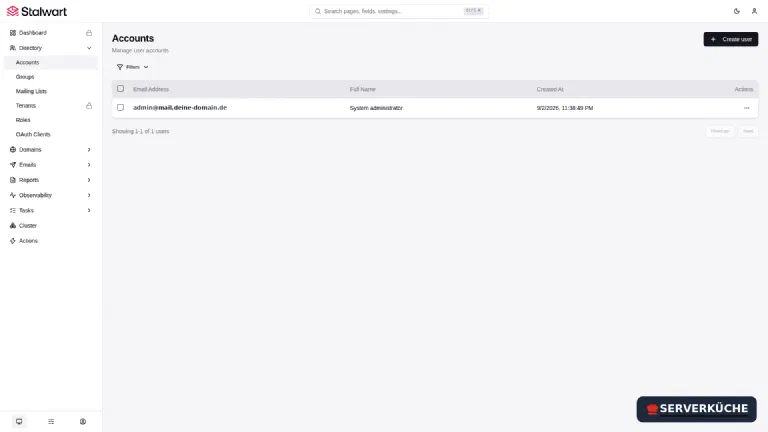
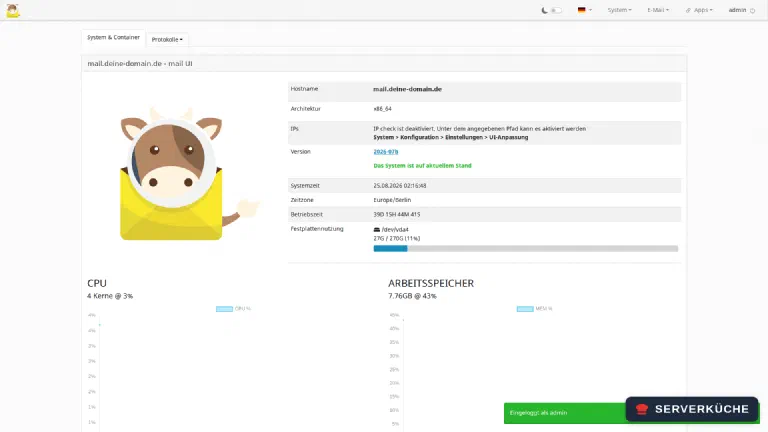
In practice that means: with Stalwart every user needs a mail program – Thunderbird, the Mail app on iOS and macOS, DAVx5 on Android for calendars and contacts. For you alone or in a household that’s perfectly fine, because those programs are set up anyway. But as soon as someone has to reach their mail from a machine that isn’t theirs, something is missing. You can put a webmail like Roundcube next to it – at which point it’s container number two.
The second difference: Mailcow brings a virus scanner along in ClamAV, Stalwart doesn’t. Stalwart’s built-in filter covers spam and phishing; you can attach a virus scanner via milter or MTA hooks, but you have to run it yourself.
Step 5: Attack surface, licence and updates
The security argument for Stalwart is often told too loudly. Rust brings memory safety, and Stalwart has a published security audit to show. But it does not follow that Postfix and Dovecot are insecure – they are among the most thoroughly examined programs on the internet.
The sustainable argument is more sober: it’s about the length of the update chain. Eighteen services mean eighteen projects with their own security advisories that somebody has to reconcile. That mailcow does exactly that, reliably, is the project’s real value – but it’s a dependency you are taking on.
With the licences the picture flips, and that’s rarely mentioned. Mailcow is entirely GPL-3.0 – everything it can do, you can use for free. Stalwart is dual-licensed: the Community edition under AGPL-3.0, alongside a commercial Enterprise licence. Both editions share the same code base and, as the vendor writes, the same protocols and core features. What the Enterprise edition adds is operational tooling for large installations: multi-tenancy, custom branding, archiving and un-deletion of deleted mailboxes, an AI-driven spam classifier, read replicas.
For a household or your own company domain, none of that is relevant. There’s still a trap in it: the large feature list on GitHub does not mark which point belongs to which edition. If you’re relying on a particular function, check the edition comparison first rather than trusting the README.
Step 6: The decision table
| Your case | Take | Because |
|---|---|---|
| You have a server with Traefik and want mail on it | Stalwart | Mailcow only fits there with 6 GB of RAM free |
| Everyone should reach their mail from any browser | Mailcow | SOGo webmail is ready to go |
| You look after mailboxes for other people | Mailcow | multi-tenancy costs extra with Stalwart |
| You want as little maintenance as possible | Stalwart | one image instead of eighteen |
| You have less than 8 GB of RAM available | Stalwart | Mailcow sets 6 GB as the minimum |
| You want a virus scanner without extra work | Mailcow | ClamAV is part of the stack |
| Thunderbird, iOS Mail or DAVx5 are in use anyway | Stalwart | CalDAV and CardDAV are included free |
| You need many years of production experience behind you | Mailcow | in use since the end of 2016 |
And if, while reading, you’ve started to suspect that you don’t actually want to maintain either of them: a reputable mail host is a perfectly legitimate answer to this question. Deliverability and reputation are continuous work, and that stays with you – no matter which software you pick.
When things go wrong
The first two points apply to every self-hosted solution and cost the most time if you don’t know about them.
Mail to the outside hangs, the logs show timeouts on port 25. This isn’t the software, it’s the host: netcup’s default policy “netcup Mail block” blocks 25, 465 and 587 outbound. You take the policy off the server yourself in the SCP under Firewall → Policys – no support case, no ticket. Affects Stalwart and Mailcow equally, see netcup firewall setup.
The mail arrives but lands in spam everywhere. Then reverse DNS (PTR), SPF, DKIM or DMARC are missing. This too is independent of the product and described step by step in email deliverability.
Mailcow won’t start, the logs report address already in use for port 80 or 443. A reverse
proxy is already running on the server and Mailcow’s own nginx wants the same ports. Either give
Mailcow the host to itself, or bind its nginx to a local port as shown in step 2 and put it
behind the proxy.
After the Mailcow setup all the other containers are suddenly gone. On an IPv6 host
generate_config.sh created /etc/docker/daemon.json and restarted Docker. That’s intended
behaviour and prevents an open relay, but it hits the whole host. Containers with
restart: unless-stopped come back by themselves, the rest you start by hand.
The mail client warns about a self-signed certificate CN=rcgen self signed cert. Stalwart
is still serving its placeholder. Check docker compose logs traefik-certs-dumper first: if it
says /traefik/acme.json is not a file, the path in the dumper doesn’t point at the directory
holding Traefik’s acme.json. If the files are in the volume, only the Stalwart restart is
missing – registered certificates are served only after that.
Containers get killed by the kernel after a short while (OOM). The server is too small for the
stack you chose. With Mailcow and its 18 containers this happens considerably earlier than with
Stalwart; as a first measure turn ClamAV off in mailcow.conf with SKIP_CLAMD=y, since the
virus scanner is the biggest memory eater.
Your problem is not listed? Search all error messages →
Maintenance & backups
The maintenance effort differs less than the container count suggests – it’s just distributed differently.
Updates you take individually and deliberately with Stalwart by moving the version tag up;
plan a look at the release notes about once a month, even though something appears weekly. With
Mailcow, update.sh runs monthly and does everything at once; read the notes it prints, as larger
jumps occasionally list manual steps.
Backups are plain with Stalwart: two volumes, stalwart_config and stalwart_data, and for a
consistent state you stop the container briefly. Mailcow brings its own backup_and_restore.sh
that pulls the many volumes and the database together. In both cases the result belongs off the
server, encrypted at best with restic.
Particularly important in both cases are the DKIM keys: if they’re lost, your signatures break after a restore until you set the DNS records again. And a backup you’ve never restored is only a hope – test the restore once on a test system.
Reputation you keep an eye on regardless of the software: check occasionally whether your server IP has ended up on a block list. A compromised mailbox sending spam ruins the reputation of your entire domain quickly – and that’s the one task neither of the two mail servers takes off your hands.
Send feedback: feedback@serverkueche.de
You might also like