Stirling-PDF: The PDF Toolbox on Your Own Server
Merge, compress, convert PDFs and make them searchable with OCR – locally instead of on online services: Stirling-PDF behind Traefik, with login.
Table of contents
“Merge PDF online”, “compress PDF free” – for tasks like these you’d usually upload your documents to some web service, often with confidential content. Stirling-PDF does the same on your own server: over 50 PDF tools, and your files never leave your control.
What are we building?
A complete PDF toolbox with Stirling-PDF v2.14.3 behind Traefik, secured with a login. By the end you merge PDFs, compress and rotate them, convert between formats, make scanned documents searchable with OCR, redact content, add passwords or watermarks – all in the browser, all locally. Exactly the right tool to prepare documents from Paperless or Nextcloud.
The standard image ships everything the tools need: LibreOffice for Office conversions, Tesseract 5.3.4 for OCR including five language packs, qpdf for repairs and Calibre for e-book formats. In return it is no lightweight at 3.4 GB – plan for the space on your system disk.
Prerequisites
- A server with Traefik running and Docker Compose
- A subdomain pointing at the server –
YOUR_DOMAINbelow - Roughly 4 GB of free disk space for the image and at least 2 GB of RAM; the container uses a good 1 GB of memory
VPS 1000 G12.5
4 vCores · 8 GB RAM · 128 GB SSD
from €14.50/month
Stirling-PDF runs well on a small VPS; only OCR of large files wants more RAM.
💶 1 month free:
Single use, valid for VPS 1000 G12.5. Redeem in the cart →
💶 €5.95 voucher for new netcup customers: always valid · not for domains or VPS Lite
Step by step
Step 1: Project and Compose file
Stirling-PDF is stateless at its core – it processes files and returns them without storing them permanently. Only configuration and OCR language data live in volumes. Create the project:
mkdir -p /opt/stirling/data /opt/stirling/configs && cd /opt/stirlingBoth folders are mounted as bind mounts in a moment: configs holds user accounts and settings, data is where additional OCR languages go.
The compose.yaml – replace YOUR_DOMAIN:
services:
  stirling-pdf:
    image: stirlingtools/stirling-pdf:2.14.3
    restart: unless-stopped
    volumes:
      - ./data:/usr/share/tessdata   # OCR language data
      - ./configs:/configs           # configuration
    environment:
      LANGS: 'en_GB'                  # UI language
    networks: [proxy]
    labels:
      - "traefik.enable=true"
      - "traefik.http.routers.stirling.rule=Host(`YOUR_DOMAIN`)"
      - "traefik.http.routers.stirling.entrypoints=websecure"
      - "traefik.http.routers.stirling.tls.certresolver=le"
      - "traefik.http.services.stirling.loadbalancer.server.port=8080"

networks:
  proxy:
    external: true
The container publishes no port to the outside – Traefik reaches it through the shared proxy network on port 8080. That way the service is only available over HTTPS.
Which image variant?
2.14.3 (standard, 3.4 GB), 2.14.3-ultra-lite (917 MB) and 2.14.3-fat. The ultra-lite variant saves space by leaving out LibreOffice and Tesseract – which drops Office conversions and OCR. For the full feature set of this tutorial the standard image is the right one; you don’t need -fat for it.Step 2: Start and wait for “healthy”
docker compose up -dThe image ships its own health check, and Traefik only routes to the container once it’s healthy. That takes about 20–30 seconds after start – the Java application needs a moment. Until then the domain answers with a Traefik 404, after that it redirects to the login page. That’s not a fault but exactly the intent: a half-started service doesn’t go online.
Check the status:
docker compose ps --format "table {{.Name}}\t{{.Image}}\t{{.Status}}"NAME IMAGE STATUS
stirling-stirling-pdf-1 stirlingtools/stirling-pdf:2.14.3 Up 47 seconds (healthy)If it says (health: starting), wait a little longer. Only once (healthy) appears is the route live.
Step 3: First login and forced password change
Open https://YOUR_DOMAIN/. Stirling-PDF v2 is protected by a login by default – an important difference from many other tools, and one you shouldn’t disable if the service is publicly reachable.
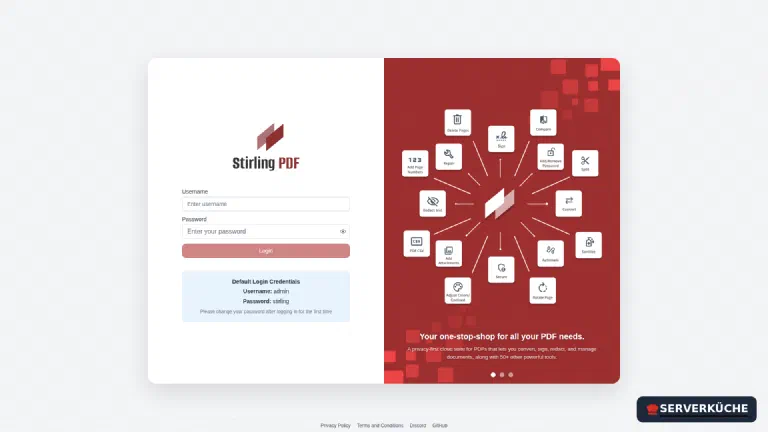
Log in with the default credentials admin / stirling. Two dialogs follow one after the other, and the first one matters for a privacy setup: Stirling-PDF asks whether you want to enable opt-in analytics. If you are self-hosting precisely so that nothing flows out, No is the fitting answer here – telemetry then stays off.
Right after that Stirling-PDF forces the password change. The form requires at least 8 characters plus a confirmation:
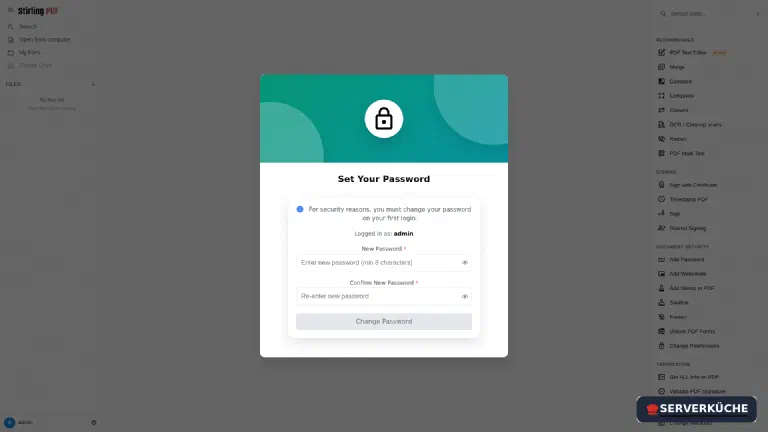
Once saved you are logged out and end up back on the login page. That’s normal: log in again, this time with the new password.
Change the default credentials immediately
admin/stirling are publicly known and even shown as a hint on the login page. As long as this password is in effect, your toolbox is open to anyone who knows the domain. The forced change on first login is intentional – pick a real, long password from your password manager.Step 4: The toolbox
After login you see the interface: your files on the left, the full tool catalog on the right, grouped into categories like Signing, Document security and Verification.
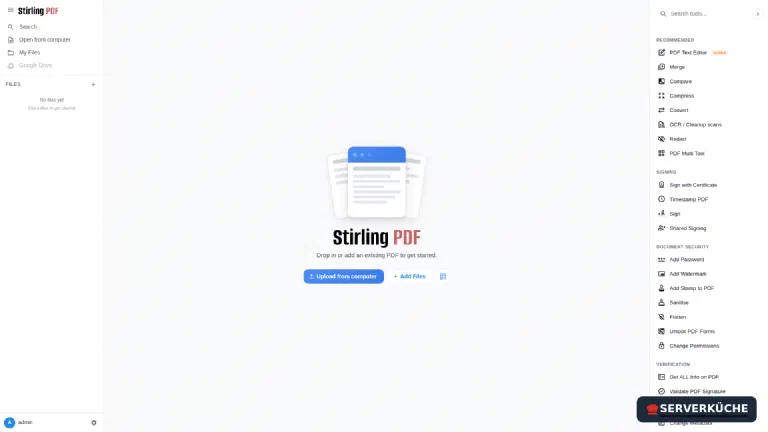
On first open the application also shows a “Welcome to Stirling V2” window; close it with the X in the top right.
Getting started is always the same: load a PDF via Upload from computer (or drag & drop), then pick the tool you want on the right. The file appears in the built-in viewer:
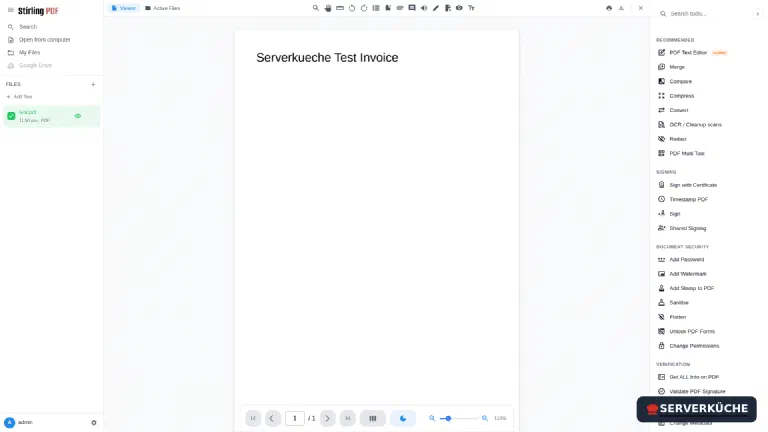
The most useful tools in everyday use:
- Merge / Split: combine multiple PDFs into one or separate out pages.
- Compress: reduce file size for sending by email.
- Convert: PDF ↔ image, Word/Office → PDF and back.
- OCR / Cleanup scans: make scanned documents searchable (that’s what the
tessdatalanguage data is for). - Redact: permanently remove confidential parts – not just paint over them in black.
Every tool works on the files selected on the left – the result replaces the selection in the workspace until you download it.
Step 5: Merge two PDFs
The most common everyday task, played through end to end: upload both PDFs in one go – the file list on the left shows them with date and page count, e.g. a.pdf · 1 Page. Pick Merge on the right. The panel walks you through three stages:
- Files – shows how many documents are selected.
- Sort Files – “Files will be merged in the order shown. Drag to reorder or sort below.” So the order isn’t random but your selection order; change it by drag & drop or via Sort By.
- Settings – two switches: remove the digital signature from the result and generate a table of contents.
A click on Merge (2 files) creates a new file prefixed with merged_ – for example merged_a.pdf with both pages in the expected order. Under Review you get Undo and Download – and below that Stirling-PDF offers the next sensible tools right away (Compress, Convert, Sanitize, Split, OCR), so you can keep working on the result without downloading it in between.
Step 6: OCR on a real scan
OCR is the tool that pays off most on your own server: a scan with invoice or contract data has no business on someone else’s web service. The workflow has four stages, numbered in the panel on the right.
Upload a scanned PDF (a pure image without a text layer) and pick OCR / Cleanup scans on the right. Under Settings there are two choices:
- OCR mode: “Auto” skips pages that already contain text, “Force” re-scans everything and replaces the existing text, “Strict” aborts as soon as selectable text is found. For a real scan, “Auto” is right.
- Languages: the expected document languages – several are allowed, which improves the hit rate.
A click on Process OCR and Review starts the run. A one-page A4 invoice is done after about 3 seconds; under point 4 the result is ready to review and download:
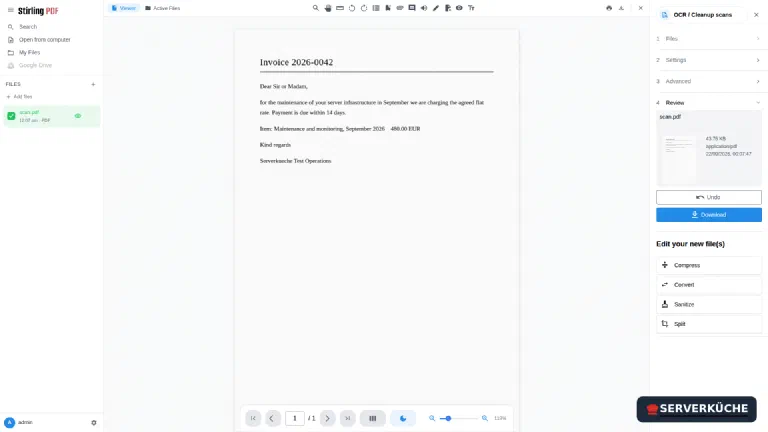
The file only grows slightly (from 42 to 49 KB, for example), because OCR puts an invisible text layer behind the image. So the scan looks unchanged, but searching, selecting and copying work – and tools like Paperless then find the content in full-text search.
Verify the result
Ctrl+F. If it’s found, OCR did its job.Step 7: Add OCR languages
The standard image ships five languages that are selectable in the OCR tool right away: German, English, French, Portuguese and Chinese. If you need another one, drop the matching .traineddata file into the mounted data folder. For Spanish, for example:
cd /opt/stirling/data
curl -fsSL -O https://github.com/tesseract-ocr/tessdata_fast/raw/main/spa.traineddata
The language files come from the official Tesseract repository; tessdata_fast is the fast variant and entirely sufficient for scans (a good 2 MB per language). Then restart the application so it reads the directory again:
cd /opt/stirling && docker compose restartAfter the restart the language shows up in the OCR tool’s selection list – “Spanish” then appears right alongside the bundled languages.
When things go wrong
The page doesn’t load (Traefik 404) even though the container is running. The health check isn’t healthy yet – Traefik deliberately doesn’t route then. Wait 20–30 seconds after start; check the status with docker inspect -f '{{.State.Health.Status}}' stirling-stirling-pdf-1. Only once it says healthy does the domain answer.
Login with admin/stirling fails. Either the password was already changed (then use the new one), or the config in the configs volume is inconsistent. To reset, stop the app and check the user config in the configs folder; if in doubt clear the folder (note: this resets all settings, after which the default credentials apply again).
I’m suddenly logged out after the password change. That’s not a fault: Stirling-PDF discards the session as soon as the password has been set. Just log in again with user admin and the new password.
A newly added OCR language doesn’t show up. The application reads /usr/share/tessdata at start. So run docker compose restart after copying the .traineddata – and check that the file really sits in the mounted data folder and ends in .traineddata.
Office conversions or OCR are missing entirely. Then you’re running the -ultra-lite variant of the image: it lacks LibreOffice and Tesseract, so those tools have no function. Switch to the standard tag (stirlingtools/stirling-pdf:2.14.3) and run docker compose up -d – the price is about 2.5 GB more image.
Large files cause errors or long waits. OCR and conversion are memory-intensive. On a small VPS RAM can run short – then either process smaller files or move to a larger product.
Your problem is not listed? Search all error messages →
Maintenance & backups
- Updates. Occasionally bump the image tag (
stirlingtools/stirling-pdf:2.14.3) to the current version anddocker compose up -d. Stirling-PDF is actively developed and gets new tools frequently; a look at the release notes is worthwhile. Because the image is large, clear out the old layer withdocker image pruneafter updating. The rest runs through your normal update process. - The backup is small. Because the file processing is stateless, you only need to back up the
configsfolder (login, settings) and any custom OCR language data – best with Restic. You store the processed PDFs yourself anyway. - Keep an eye on resources. The container uses about 1 GB of RAM at idle; an OCR or conversion run adds to that briefly. If another heavy application runs on the same server, a memory limit in the Compose file is worth it.
- Security. The login is the first line of defense – keep the admin password strong and current. Since potentially confidential documents pass through here, running behind HTTPS (Traefik) and a login is mandatory; a publicly reachable Stirling-PDF without a password would be a serious data leak. If you’re the only user, put a second hurdle in front of it: a Traefik middleware with basic auth or an IP restriction or run it VPN-only right away.
Last updated: Sep 21, 2026
Send feedback: feedback@serverkueche.de
You might also like